
ASUS Matrix RTX 5090 Review: 800W Power, Extreme Overclocking, and Halo GPU Design
ASUS Matrix RTX 5090 showcases extreme engineering choices aimed at enthusiasts prioritizing overclocking potential over practicality.
Hardware by Nahe Yan on Jan 03, 2026
It's been a while since GPUs were talked about, so let's talk about one of the most costly graphics cards for consumers. ASUS Matrix is the main focus here, not the Astral. This product is being marketed as a "halo release" in honor of ASUS's 30th anniversary.
It was designed to be less of a popular choice and more of a functioning prize that shows off high-end engineering, powerful power delivery, and experimental design.
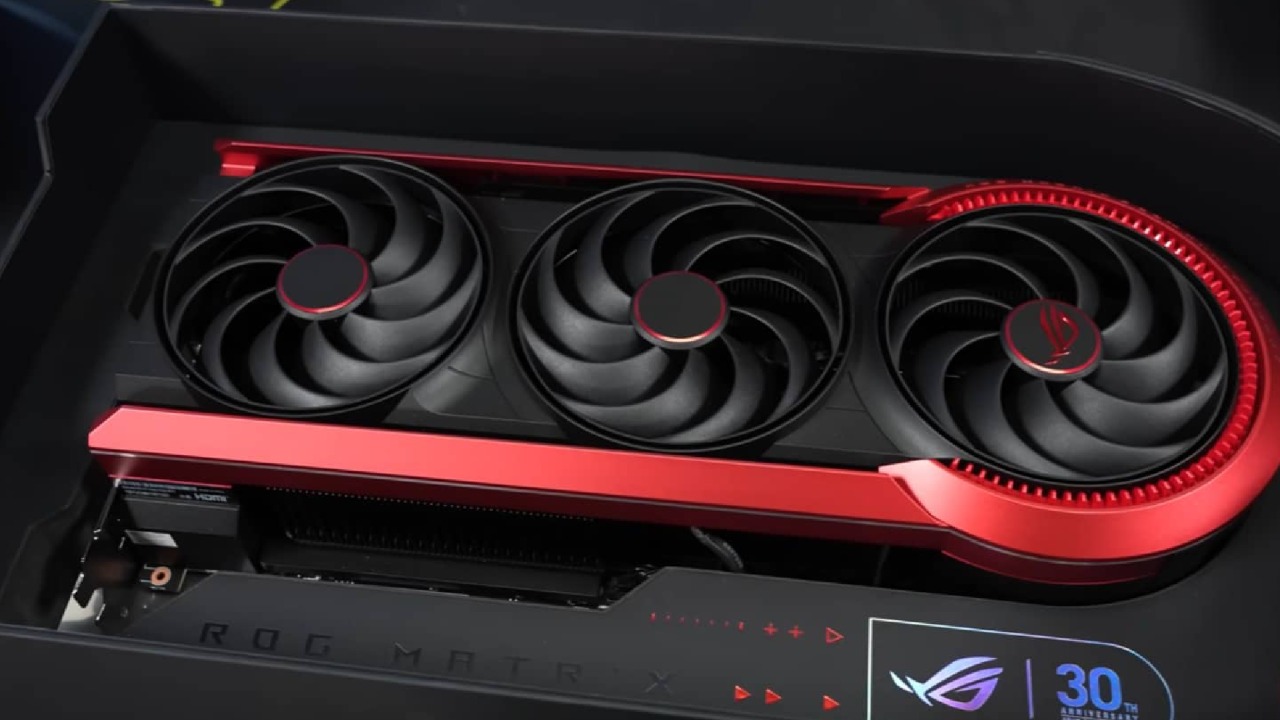
Differences Between Matrix and Astral Design
People often think that the Matrix is just an Astral card with a bigger, cooler appearance at first. That idea doesn't hold up when you look more closely. The PCB structure looks the same, but the power phase architecture and internal organization are different enough that a water block made for Astral wouldn't fit the Matrix. This supports the assumption that the Matrix is meant to be used as is, and that its look is one of the reasons to acquire it.
Astral still stands out because its black, gunmetal, and gray look goes with most builds. Matrix, on the other hand, has a lot of red in its design, which makes it less flexible in terms of themes. The Matrix is slightly higher and has a more pronounced finish. The fans have more blades and a more sweeping profile, which is clearly better for airflow in a dense fin stack.
Layout of the Power, Cooling, and Connectors
Power is one of the main things that sets them apart. When both the 12V2x6 high-power connector and the BTF connector are plugged in, the Matrix can handle up to 800W. This goes beyond the 600W restriction that most RTX 5090-class cards have. The fins on the cooler are closer together, which makes it look thicker than the Astral's. Instead of regular thermal paste, liquid metal is used, which improves heat transfer.
The way the connectors are set up makes things more difficult. The 12V2x6 port is slightly off-center and has a tight cover. Standard cables fit OK, but bigger or custom connectors might not. Some aftermarket cables don't fit properly, which is a problem when you're dealing with a GPU that costs about $4000. In some cases, a provided adapter makes everything work together, but it doesn't look good.
Accessories and Showing
The packing experience is very focused on appearance. There are items inside that showcase ASUS's history, such as a deck of cards featuring earlier products. It comes with screws, Velcro straps, mounting hardware, and a combination GPU support and multitool. These things make it seem like owners should be able to play with or show off the card rather than just put it in and forget about it.
Setting up and Using Benchmarking Philosophy
When configured to default settings, RTX 5090 GPUs usually work within 1% of each other because power limits are met before other limits. For this reason, we ignored baseline benchmarking and instead looked at what occurs when the Matrix is allowed to stretch its legs. There was no BTF motherboard available, so the card was changed to think it was linked to one, which allowed the maximum power budget.
After the changes, the card always drew between 650W and 760W, with short spikes higher. During testing, it never used a full 800W.
Results from the Synthetic Benchmark
Matrix got 41,312 points in Port Royal when it acted like a stock RTX 5090 FE, which is about 38,000 points. Clock speeds stayed just above 3000 MHz; they did not drop as the temperature increased. In these settings, the score was still far off the scoreboard, which starts at about 45,000.
The score went up to 43,279 when the core was overclocked by +200 and the RAM by +1500. This showed that the extra power budget led to meaningful gains, but not ones directly related to the power increase.
RTX 5090 FE scored 14,412 points in Speedway, but the Matrix scored 16,590 points after overclocking. In Time Spy Extreme Graphics, the FE got a score of 25,451 while the Matrix got a score of 29,271, which is almost 4,000 points higher.
How Well it Plays Games at 4K
We ran all the gaming tests at 4K because the technology in this price range was meant for high-end monitors.
In Black Myth Wukong, the average frame rate went up from 85.6 fps to 73.7 fps. 1% lows on the FE are 94.2fps and 80.9fps, and 1% lows on the Matrix are 94.2fps and 80.9fps. Avatar Frontiers of Pandora had a minor but significant increase, going from an average of 113.5 fps to 119.2 fps. The lowest 1% of frame rates improved from 91.6 to 94.4.
Higher clocks helped Cyberpunk2077 a lot. The average performance went up from 60.2 fps on the FE to 70.4 fps on the Matrix. The Matrix's 1% low of 60.4 fps was higher than the FE's average, indicating it was more consistent under stress.
Horizon Forbidden West went from an average of 122.4 fps on the FE to 140 fps on the Matrix, while the 1% lows went up to 92.3 fps. F12024 had one of the biggest advances, going from an average of 153.3 fps to 178 fps. Borderlands3 went from 172.7 fps to 202.7 fps.
Thermals and How Power Works
Matrix cooler worked well at dissipating heat. Even though the power usage was over 600W, the temperature stayed in the upper 60°C range with the fans set to stock. When the fans were at 100%, the highest temperatures dropped to about 58°C. A thick heatsink and liquid metal are involved.

Things to Think About
Matrix has trade-offs, even though it works well. It's hard to take off the BTF extension because it's so closely packed between the PCB and the backplate. The little cover for the 12V2x6 connector doesn't seem safe and can easily slide off. These are small things, but they stand out at this price point.
To get maximum power from the card, you need to use both BTF and 12V2x6 ports. This makes the card very closely linked to ASUS's environment. A dual 12V2x6 design might have enabled it to work with more devices without losing any power.
Final Thoughts
ASUS Matrix isn't meant for regular customers. There are only about 1,000 of these products, so their prices reflect their rarity. There are actual performance advantages over a standard RTX 5090, especially when overclocked, but they don't justify the price increase.
The card's main benefit goes away if you don't want to overclock it. Matrix offers something special for people who like to try new things, have a lot of power, and collect hardware. It shows that producers are ready to take risks on high-end designs, even if the end product is more of a trophy than a tool.
Also, check our other NVIDIA articles below:
- GeForce RTX 5090 Unleashed: Is NVIDIA's New Flagship the Ultimate 4K Gaming GPU?
- NVIDIA GeForce RTX 5080 Review (2025): Still A 4K Gaming Powerhouse?
- RTX 5090 Performance Testing In GTA 5 – 1080p, 1440p, and 4K Max Settings Benchmark
- RTX 5090 Laptop Vs. M4 Max MacBook Pro: Ultimate Raw Performance Vs. Battery Endurance
- NVIDIA RTX 5070 Review: Mid-Range Muscle or Marketing Hype?
- RTX 5070 Ti Review: Performance, Thermals & Power Efficiency Tested
- Asus ROG RTX 5090 Astral OC Vs. Founders Edition: The 4K Gaming Benchmark
- ASUS GeForce RTX 5090 LC Liquid Cooled GPU Review: Unmatched Silence & Speed
- MSI GeForce RTX 5090 32GB SUPRIM SOC Review: Power Efficiency, Cooling, and Gaming Performance
- INNO3D RTX 5060 Ti 16 GB X2 Review: Gaming Benchmarks, Temps, and Power Efficiency
- HP Omen 45L Review: RTX 5090 Performance, Thermals, and Value Analysis
- ASUS TUF Gaming GeForce RTX 5060 Ti Review: DLSS 4, Power Efficiency, and Gaming
- ASUS Prime RTX 5060 Ti OC 16GB Review: DLSS 4, Ray Tracing, & Thermals Tested
- NVIDIA GeForce RTX 5060 Review: Specs, Gaming, and Cost per Frame
- MSI GeForce RTX 5090 GAMING TRIO OC Review: A Monster Power GPU
Editor, NoobFeed
Gaming Hardware Updates
No Data.