
ASUS ProArt X870E Creator Review: Ultimate Stability and Performance for Content Creators
AM5 CPU socket paired with X870E chipset delivers high bandwidth, Wi-Fi7, and USB4 connectivity for professional tasks.
Hardware by Tanisha Aria on Nov 14, 2025
The ProArt X870E Creator has a clear and focused approach. It is a stable platform designed for content producers who value dependability, bandwidth, and long-term performance.
The board features a clean and elegant design, built with robust engineering to ensure it cools effectively, lasts a long time, and operates consistently, even under heavy production tasks.
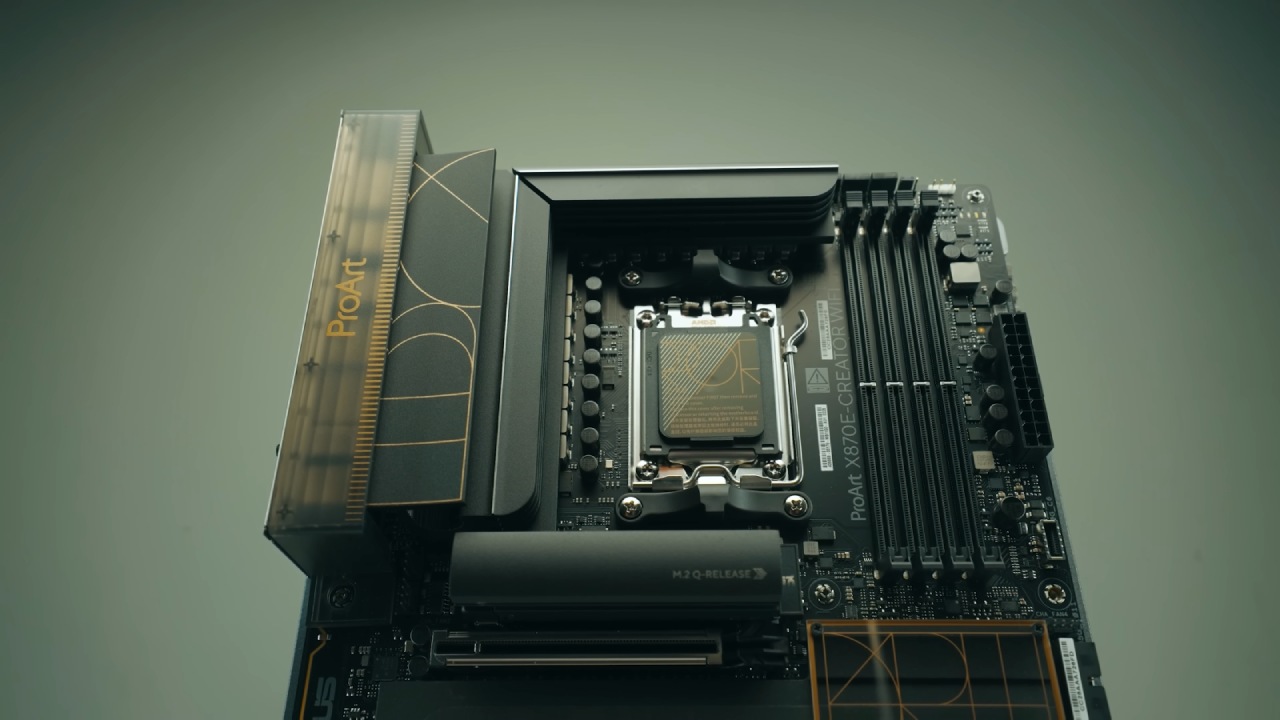
Design and Build Quality
The X870E Creator features a robust base composed of 8FSR4 low-signal PCB layers, reinforced with 2oz copper plating to enhance its resistance to heat and wear over time.
Its design features a clever contrast between matte and shiny surfaces, giving it a clean and focused look that emphasizes engineering. The cooling parts have been carefully sanded to remove any unnecessary RGB components. There are still three RGB ports on the board for adding more lights if desired.
Chipset, Socket, and Connectivity Foundation
With 24 PCIe 5.0 lanes from the CPU, the motherboard supports a wide range of Ryzen CPUs, thanks to its AM5 CPU socket and AMD's top-of-the-line X870E chipset.
This chipset supports both older PCIe standards and more recent ones, such as Wi-Fi 7 and USB4. The chipset cooling plate is thick, strong, and highly effective in maintaining the Promontory21 chip at the optimal temperature, even under high stress.
VRM Architecture and Thermal Performance
The 20x80A dedicated power stage array in a 16+2+2 configuration provides up to 1300A of tightly controlled CPU power. The VRM design puts stability first. The phase layout ensures that the clock responds quickly and that delivery remains steady, even when the system is busy.
The thick walls of the cooling blocks absorb heat, and the wide, spreading plates help distribute the heat evenly. The second block is tall, thick, and features that allow heat to escape quickly. Two thermal pads ensure that heat is transferred quickly from the chokes to the power stages.
The thermal performance remains very good, whether you use the stock settings or the AI Boost options. VRM temps stay well below 50°C.
Both cooling blocks reach stable saturation early in the stress test and keep the same temperature for the whole 60 minutes of load. The stability-driven design is clearly aimed at creators who need to know how the temperature will behave during long work sessions.
CPU Recommendations and Cooling Considerations
We are confident that the X870E Creator will work well with processors up to the Ryzen 9 9950X, as it delivers power quickly. The 80A stages may not seem like much, but the technical choices make them work well with CPUs that have a large number of cores.
All of this is important, but it doesn't matter if the CPU isn't properly cooled. If you plan to use R9 processors to create a large amount of content, you will need a large cooler. Full-load work on a 12-core Ryzen 9 9900X stays well below 70°C. Memory Support and Limitations.
The board can handle up to 256GB of DDR5 in a dual-channel setup, which can reach speeds of up to 8000MT/s. This is fast, but boards in the same price range often reach speeds of up to 9,000 megatransfers per second (MT/s).
Although high-end Hynix M-die Patriot Viper Extreme 5 RAM was used, the board would not test above 7400 MT/s. Although 7400MT/s is still very fast, the primary issue is that the stated speeds do not always match the actual speeds. This issue may be resolved by a future BIOS update.
Storage Configuration and NVMe Cooling
The storage's structure, featuring four SATA 3 ports and four M.2 slots, is ideal for creators. Two of the M.2 slots are CPU-fed PCIe 5.0 and can transfer data at speeds of up to 128GB/s. A tall heatsink with two thermal pads is used to cool the main M.2 slot, which is the most modern.
During a one-hour stress test using the fastest SSD available, temperatures never exceeded 35°C, leaving 65°C of thermal headroom before the SSD slowed down. Each of the two PCIe 4.0 slots, fed by the computer, offers 64GB/s and features thick, thermally padded plates.
The PCIe 5.0 slot has a catch that doesn't require screws, but the other three M.2 slots still use small screws. ASUS is still one of the few companies that doesn't have fully screwless designs for all M.2 slots.
.jpg)
PCIe Expansion and GPU Support
As a board designed for creators, it features two PCIe 5.0 GPU slots with stronger frames and a slim-lock feature for large GPUs. A single GPU receives all 16 PCIe 5.0 lanes, while two GPUs utilize only 8 lanes each.
Dual GPUs aren't particularly useful for gaming. Still, they can significantly speed up rendering, editing, deep learning, and other computationally intensive tasks.
A third PCIe slot, which is fed by a chipset, is still not very useful and could have been left out without any loss.
PCIe Lane Bifurcation Behavior
The spread of PCIe lanes is carefully controlled. When the PCIe 5.0 M.2 slot is used, the second GPU space reduces from 8 lanes to 4 lanes. The small chipset-fed slot is disabled when the PCIe 4.0 M.2 slot is in use.
ASUS does the right thing by keeping the most important features, such as dual GPUs and the main PCIe 5.0 SSD slot, on their own lanes.
Rear I/O and USB Bandwidth
On the back, there are various types of USB ports, with speeds of up to 170Gbps for 10Gbps, 20Gbps, and 40Gbps links. The front header adds 25Gbps, and the USB-C port on the front can charge devices at up to 30W, which is twice the standard 15W.
There are multiple display outputs for integrated graphics processes, which help creators who use CPUs for editing or diagnosing.
Networking Capabilities
With 2.5 GB LAN and a full 10 GB LAN port, networking takes a significant step forward. This makes it perfect for NAS-heavy processes that stream 4K files or sync large projects. Wi-Fi 7 introduces low-latency wireless communication. They work together to make one of the most complete networking sets for creator motherboards.
Audio Solution
When you pair the ALC1220P audio codec with 300µF capacitors, you get clean but not great sound from the onboard speakers. As content creators, we strongly advise pairing the board with an external audio interface to achieve the best sound quality when recording and mixing.
Cooling and Monitoring Features
For cooling, there are eight PWM fan headers and an AIO pump plug, which provide full control over the airflow in your system. A thermal probe connection lets you check the temperature inside for better thermal tuning.
The EZ Debug LED, Clear CMOS, and BIOS Flashback buttons are all troubleshooting tools. Even though the board doesn't have a Q-Code display, external devices like the OLED screen on the 360 Panorama AIO can do a lot of live tracking.
.jpg)
Final Thoughts
In the US, the ProArt X870E Creator Wi-Fi costs about $500. Although it's not inexpensive, the board's engineering accuracy, long-term stability, dual-GPU support, large storage capacity, top-notch connectivity, and superior thermals make it worth the price.
A 5-year guarantee is longer than the typical 3-year coverage, indicating that the company is confident in the product's durability and reliability.
As a bonus, you receive 3 months of Adobe Creative Cloud, valued at nearly $200, making it even more appealing for artists who have been using Adobe for a long time.
The ProArt X870E Creator is a very stable and feature-rich platform designed to work well in demanding production settings. It's ideal for content creators, 3D artists, data professionals, and anyone else who requires the highest bandwidth and stability.
Also, check our other AMD articles:
- AMD Ryzen 9 9950X3D Review: Setting The Standard For 2025 Gaming CPU
- AMD Ryzen 7 9800X3D Review: 3D V-Cache Goes God Mode with Stunning Gaming Performance
- AMD RX 9070 Performance Review: Thermals, Clocks, and Real-World FPS
- AMD Ryzen 5 7600 Review: Best Budget Gaming CPU of 2025?
- AMD Radeon RX 7800 XT Review: RDNA 3 Power For Midrange Gaming
- Sapphire NITRO+ AMD Radeon RX 9070 XT Review: The Ultimate 4K Gaming GPU
- AMD Ryzen 7 7800X3D: Delivers Gaming Performance Far Beyond Expectations
- AMD Ryzen 9 7900X Review: Powering the AM5 Era with DDR5 & PCIe 5.0
- ASRock Radeon RX 7800 XT Challenger OC Review: Best Price-to-Performance GPU of 2025
- Intel Core i9‑14900K vs. AMD Ryzen 7 7800X3D: Power Profiles & Gaming Benchmarks
Contributor, NoobFeed
Gaming Hardware Updates
No Data.