
ASUS ROG Xbox Ally X Setup and Performance Breakdown for Modern Gamers
Built for flexibility, supporting Xbox, PC, and PlayStation titles through seamless integration with Windows and cloud gaming services.
Hardware by Tanisha Aria on Oct 20, 2025
The ROG Xbox Ally X is a compact handheld that gives you the experience of gaming on both consoles and PCs. It has everything a gamer needs: speed, design, and efficiency, which is great for those who want smoothness and portability.
It sets a new benchmark for portable gaming with its 120Hz VRR display, 1TB SSD, and AMD's new Z2 Extreme chip. The device has better grips and a clean Xbox-style interface. It also has the power of a PC and the comfort of a console.
.jpg)
First Impression
The ROG Xbox Ally X comes in a box that is simple but looks high-end. The package comes with the handheld, a 65-watt power brick with a USB-C cable, warranty information, and a quick start guide. The cardboard stand inside the lid is a nice touch that makes it great for display or use on a table.
The handheld feels strong and well-made right out of the box. The new grip design is easy to see right away. It feels more like a controller and is more comfortable. The rounded controller-style grips are different from the square ones on older ROG handhelds. They are more comfortable to hold for long periods of time, like on Xbox and PlayStation controllers.
Design and Construction
The matte black finish on the buttons and chassis of the device gives it a sleek, unified look. The only colors are the LED rings around the thumbsticks, which you can turn off or change in the settings. The collaboration has a lot of personality thanks to small design details like the engraved Xbox and ROG logos.
The design has a big ROG vent logo on the back, and the overall shape looks like the Xbox Series X. The full-sized thumbsticks, shiny D-pad, and shiny ABXY buttons all add to the high-quality build. The power button also works as a fingerprint reader.
The top of the device has two USB-C ports, a headphone jack, a microSD card slot, and volume controls. Triggers and bumpers are big and give you a satisfying feel, just like regular console controllers.
How to Set Up
It's easy and quick to set up the ROG Xbox Ally X. You will need to sign into Windows and install updates after plugging in the charger and turning it on. This usually takes about 30 minutes. Once the process is finished, the system boots directly into the new Xbox interface. Signing in to your Xbox account finishes the setup. Compared to older ROG models, the whole process feels more streamlined, with fewer steps and less complexity.
The Xbox UI
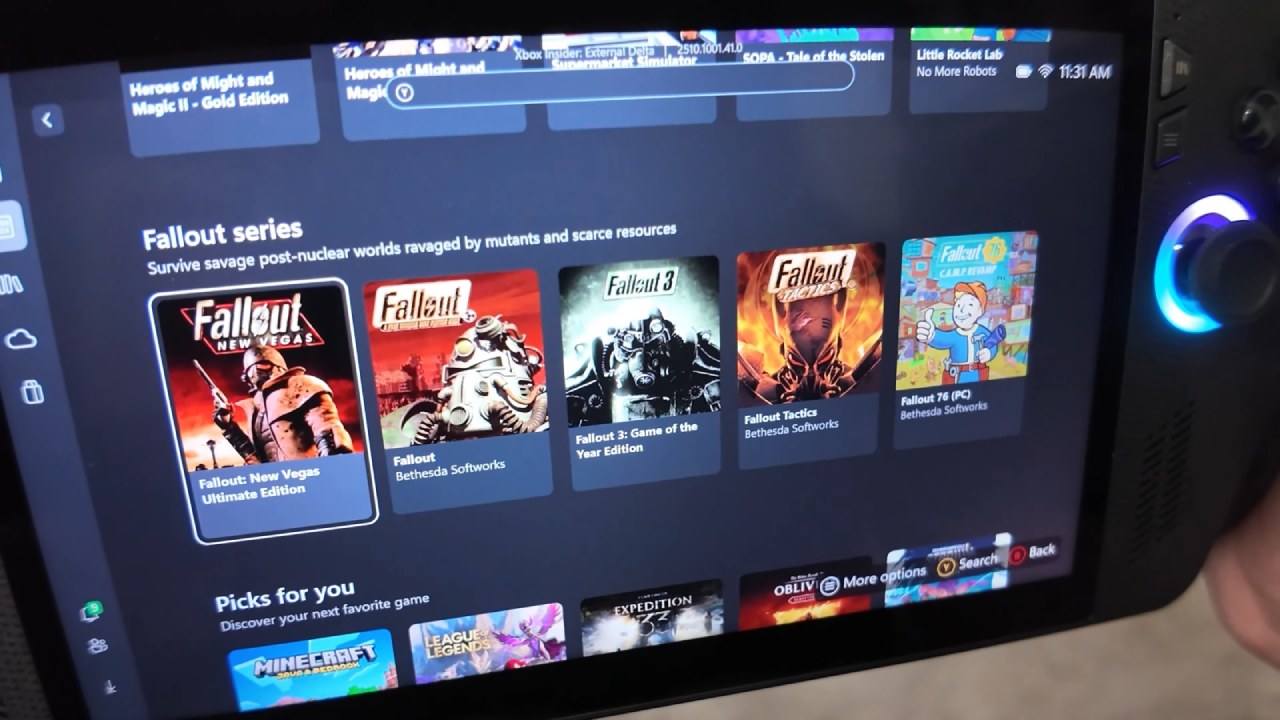
When you turn on the handheld, it goes right to the new Xbox UI, which was made just for playing games on the go. It feels like a real handheld console, hiding the Windows 11 system almost completely. If you've used Game Pass or an Xbox console, you'll find the interface to be clean, responsive, and easy to use.
By default, all unnecessary Windows processes are turned off. This speeds up performance and cuts down on clutter. The home screen shows your full library, including Xbox, Game Pass, Steam, and Epic Games entries, as well as recently played titles. Each launcher works well with the others, so Xbox games can be played alongside games like Call of Duty and Spider-Man Remastered.
If you tap the Xbox button quickly, a side menu will open with controls for volume, brightness, power, and the network. Across the top are tabs that show your friends list, capture tools, and live performance metrics for CPU and GPU usage.
Playing Xbox Games
The ROG Xbox Ally X gives you a lot of choices when it comes to Xbox gaming. You can download games directly to the 1TB SSD, stream them through Game Pass Cloud Gaming, or play them remotely from your console. The 7-inch 1080p screen on the device is bright, sharp, and very smooth, which makes games like Forza Horizon 5 look great.
The ergonomic grips make it comfortable to play for long periods of time, and you can dock the handheld to a TV or monitor to turn it into a full console experience. Adding an Xbox controller over Bluetooth makes this setup even better.
Most types of games work well when streamed through the cloud, but first-person shooter games like Call of Duty Black Ops 7 show latency problems. Downloading or playing locally is still the best way to have fun.
How well PC games run
Even though it has the Xbox name, the Ally X is still a Windows 11 handheld at its core. You can switch to desktop mode by holding down the Xbox button, which lets you use your PC like you normally would. The Xbox UI is still the better choice for gaming, though.
Steam and Epic PC games fit right in with the Xbox interface and can be launched right from it. Games like Cyberpunk 2077 run very well, with no noticeable frame drops and smooth performance. With the AMD Z2 Extreme chip, 24GB of RAM, and an 80Wh battery, it runs games smoothly and powerfully.
Testing Spider-Man Remastered shows that the device has stable frame rates and clear motion, even at high settings. When you dock it, you can also use it as a mini portable PC by connecting a keyboard, mouse, or monitor.
If you use Steam, here's a tip: instead of redownloading games, move your existing library from another PC to your own.
Choices for PlayStation games
The Ally X is also flexible for people who like PlayStation. You can use Steam or the PlayStation Plus PC app to play games like God of War or The Last of Us. The app only works with PS4 games and not PS5 games, but it's still a great way to play a lot of PlayStation games on one device.
Days Gone and The Last of Us Remastered are two games that work well and automatically sync existing save data, making the experience feel like one.
Protection and Accessories
The brand makes important accessories just for the ROG Xbox Ally X. Their tempered glass screen protector is easy to put on and keeps scratches from happening. The Kill Switch case adds protection and makes it easier to hold. The rubberized finish makes it more comfortable to hold and has a kickstand for playing on a table.
The hard shell carry case protects your stuff well while you're travelling without blocking any fans or buttons. It's a useful addition for people who plan to carry the device a lot.
The Command Center
The built-in command center is a great way to make quick changes. You can use the dedicated button to change the brightness, sound, performance modes, and on-screen tools like FPS counters or resolution options. You can change the layout by adding shortcuts for RGB controls, screenshots, or airplane mode. This gives you full control without having to leave your game.
Using multimedia and being productive
The ROG Xbox Ally X is mostly a gaming device, but it also runs Windows 11, so it can easily do work. You can connect it to a monitor or ultrawide display with USB-C, use a keyboard and mouse with it, and do all the things you would do on a regular PC, like browse the web or write.
The speakers on the front of the device make the sound clear and balanced, which improves both gaming and watching videos. The forward-facing design keeps sound from being muffled, which is a big improvement over speaker setups that face down.
When you look at the Original ROG Ally
The Xbox Ally X has a number of physical and internal improvements over the original ROG Ally. The matte black finish, Xbox branding, and new grips are the most obvious changes. The new AMD Z2 Extreme chip works about 20% better than the old Z1 and Z1 Extreme chips.
The base model is still a good handheld, but the better ergonomics of the Ally X make it feel much better to use, especially for long periods of time.
.jpg)
Final Thoughts
The ROG Xbox Ally X is a powerful and flexible handheld that lets you play games on both consoles and PCs. It stands out in the portable gaming space because of its sleek design, new Xbox UI, better hardware, and more comfortable design.
In the US, it costs $999, which is more than most consoles, but it's worth it for those who want a device that can do everything because it can play Xbox, PC, and even PlayStation games. It doesn't feel like a portable PC; it feels more like a full-fledged handheld console made for all kinds of gamers.
ROG and Xbox have worked together very well, improving both design and software integration. The only real drawback might be the price, but for people who want a small machine that can do a lot of things well, the ROG Xbox Ally X is hard to beat.
Also, check our other ROG Ally articles below:
- ROG Xbox Ally X vs. Original Ally: Real-World FPS and Power Efficiency
- Next-Gen Xbox or No Console: Understanding the Impact on Games and Gamers
- Inside the ASUS ROG Xbox Ally: Power, Portability, and PC Gaming Without Limits
- ASUS ROG Xbox Ally Review: Ergonomics and Windows 11 Full-Screen Experience in 2025
- ASUS ROG Xbox Ally X Hands-on: Ryzen Z2 Extreme Power and Full-Screen Windows Experience
- Xbox Magnus: Next Generation Console with AI Power and PC Hybrid Design
- ROG Ally X Gets Xbox-Like Features with Latest Armoury Crate Update
- Future of Xbox: Cloud Gaming, Game Pass, and Hardware Exit Plans
- Xbox Series X vs. Xbox One X: Which Console Is Best for Backward Compatibility in 2025
- Xbox Full Screen Experience on the Lenovo Legion Go
Contributor, NoobFeed
Gaming Hardware Updates
No Data.