
Pokémon Legends: Z-A Guide | How to Create a Character
Here's a guide on how to create a character in Pokémon Legends: Z-A.
Game Guide by Ragib Rawnak on Oct 21, 2025
When you begin Pokémon Legends: Z-A, you will first go through a brief introduction to Lumiose City and handle some basic setup before the main adventure begins.
During this time, you will make a lot of important decisions, like what language to use, how to look, and what to name yourself. Some of these choices are permanent, but you can change others as you progress.
.jpg)
Choosing a Language
The first thing you'll do is pick a language for your game. Once you start saving the file, you can't change your mind about this choice. Once you confirm your selection, the chosen language becomes permanently attached to that particular game file, so ensure it is the one you want to use throughout your playthrough in Pokémon Legends: Z-A.
Selecting an Appearance
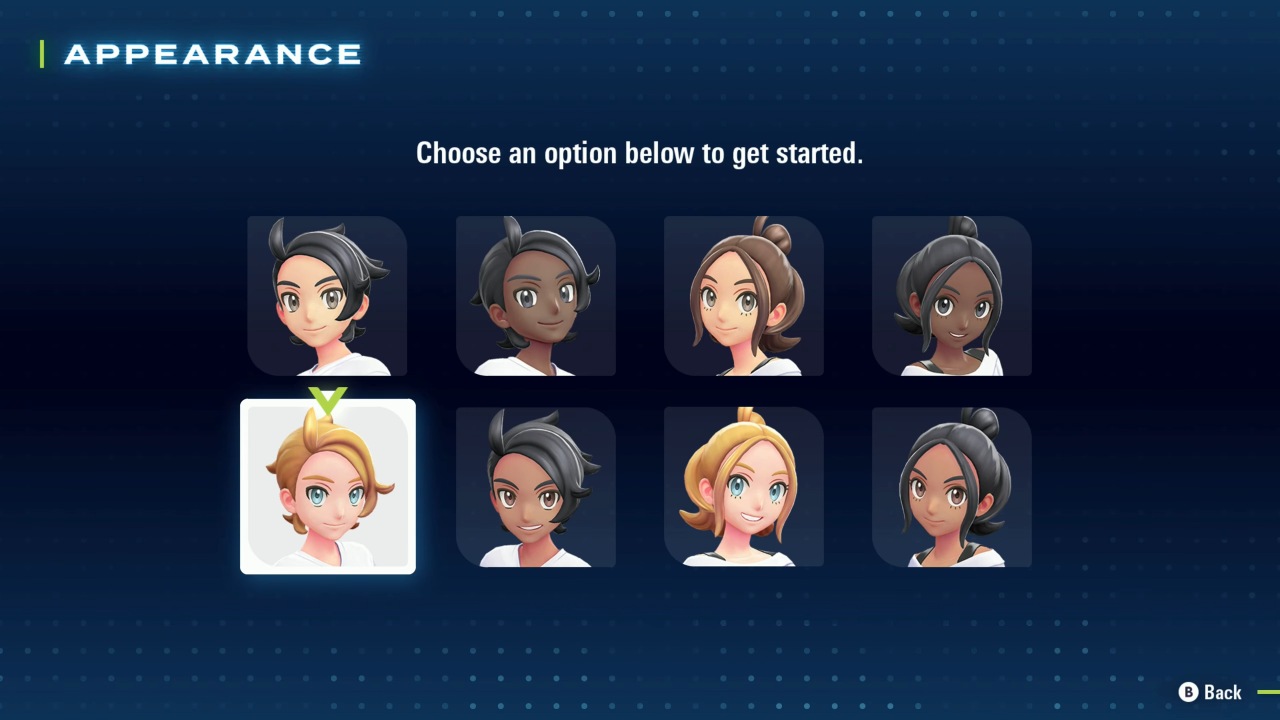
After setting your language, you choose a character model. There are eight models—four masculine and four feminine—serving as starting templates.
All fashion options, like hairstyles, clothing, and facial features, are shared between types. Gender and skin color cannot be changed later; they are locked after selection. Other features, such as hairstyle and clothes, can be modified later.
Meeting Urbain or Taunie
Your choice of character model determines your first encounter: feminine models meet Urbain, masculine models meet Taunie, setting the stage for Lumiose City. You can't change models or skin tone afterward, so choose carefully. Other features can be customized later in Pokémon Legends: Z-A.
Naming Your Character
Once your appearance is set, you will be prompted to choose a name. This name identifies you throughout the game and will be displayed when other characters address you.
It also appears on your Pokémon’s Original Trainer label and is visible to others during multiplayer sessions.
Remember not to include your full first and last name when creating your in-game identity. This name becomes your permanent identifier for the save file, representing your character across all interactions within the world in Pokémon Legends: Z-A.
Adjusting Hair Color and Other Looks
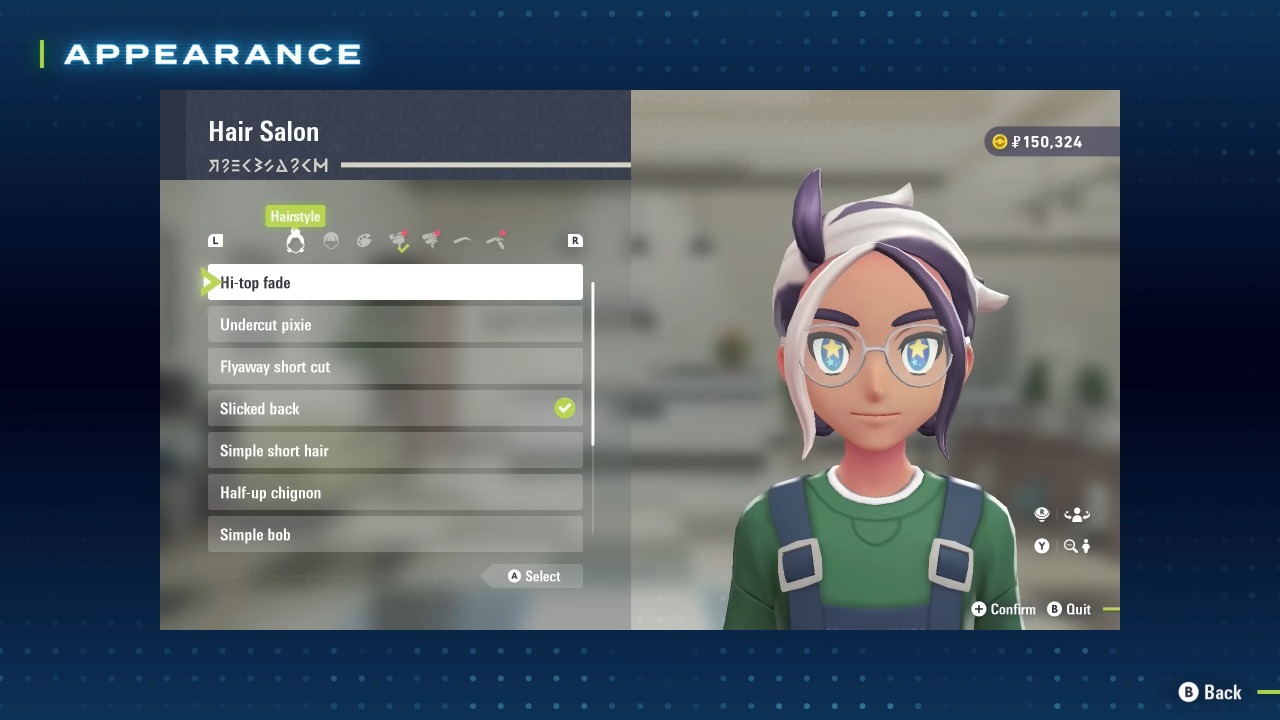
After setup, you can adjust features like eye shape, color, eyelash and eyebrow styles, beauty spots, freckles, and dark circles. These are reversible through the in-game menu. When satisfied, select Ready! to finish customization and proceed in the story.
Later, you can visit a salon or buy clothes to update your look, personalizing your style as you explore Pokémon Legends: Z-A and Lumiose City in Pokémon Legends: Z-A.
Also, check our Pokémon Legends: Z-A Review. and other guides below:
- Pokémon Legends: Z-A Beginner's Guide | Gameplay Tips & Tricks
- Pokémon Legends: Z-A Guide | How to Choose a Starter
- Pokémon Legends: Z-A Guide | All Characters
- Pokémon Legends: Z-A Guide | All Pokémon Types
- Pokémon Legends: Z-A Guide | What is Mega Evolution
- Pokémon Legends: Z-A Guide | How to Activate Mega Evolutions
- Pokémon Legends: Z-A Guide | How to Get Mega Kangaskhan and Kangaskhanite
- Pokémon Legends: Z-A Guide | How to Get Mega Gengar and Gengarite
- Pokémon Legends: Z-A Guide | How to Get Mega Slowbro and Slowbronite
- Pokémon Legends: Z-A Guide | How to Get Mega Alakazam and Alakazite
- Pokémon Legends: Z-A Guide | How to Get Houndoom
- Pokémon Legends: Z-A Guide | How to Get Heracross
- Pokémon Legends: Z-A Guide | How to Get Froakie Early
- Pokémon Legends: Z-A Guide | How to Claim Mystery Gifts
- Pokémon Legends: Z-A Guide | How to Get Sableye
- Pokémon Legends: Z-A Guide | How to Get Mawile
- Pokémon Legends: Z-A Guide | How to Get Gardevoir
- Pokémon Legends: Z-A Guide | How to Get Tyranitar
- Pokémon Legends: Z-A Guide | All New Mega Evolutions
- Pokémon Legends: Z-A Guide | All Base Game Mega Evolutions
- Pokémon Legends: Z-A Guide | How to Get Mega Charizard Y and Charizardite Y
- Pokémon Legends: Z-A Guide | How to Create a Character
- Pokémon Legends: Z-A Guide | How to Catch Eevee
- Pokémon Legends: Z-A Guide | How to Get Mega Charizard X and Charizardite X
- Pokémon Legends: Z-A Guide | How to Get Mega Beedrill and Beedrillite
- Pokémon Legends: Z-A Guide | How to Get Mega Pidgeot and Pidgeotite
Senior Editor, NoobFeed
Latest Articles
No Data.