
Lenovo Legion 7i 2025 Review: Thinner, Lighter, Faster with a Brilliant OLED Upgrade
Growing anticipation surrounds Intel Core Ultra 300 as industry watchers await performance insights ahead of CES 2026
Hardware by Tanvir Kabbo on Dec 10, 2025
Lenovo Legion 7i has undergone major changes this year. It arrives thinner, lighter, faster, and now features a stunning OLED display.
On paper, it appears to be a clear improvement, but paper cannot run the latest games. What truly matters is how these upgrades perform in actual use.
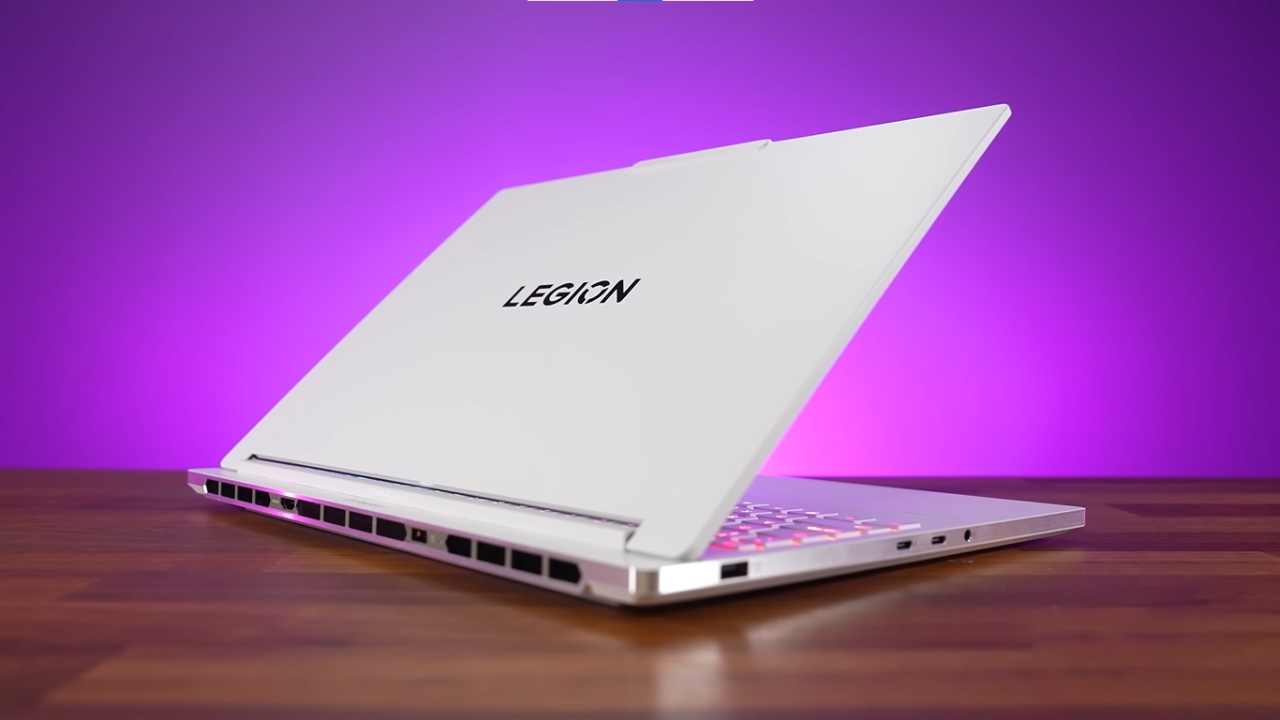
Design and Build
Lenovo offers the Legion 7i in white in most regions this year. The overall shape is still comparable to last year's model, but it has a high-quality anodized aluminum finish. The keyboard deck and display are both quite sturdy, with very little flex. The screen stays still when you type; however, the front edge can feel a little harsh if your hands touch it.
The hinges feel smooth and sturdy, allowing the lid to close securely and open effortlessly with one finger. The lid's slight forward protrusion helps with grip. The screen also extends nearly the full way back.
This year, Legion 7i is marginally wider and deeper but slightly thinner. At 4.3lb/2kg for the laptop alone and 5.9lb/2.7kg with the 245W charger, it is one of the lightest 16" gaming laptops available. It only trails slightly behind certain ultra-light competition. The new charger also contributes to reduced overall carry weight compared to last year.
Specifications and Configuration Options
Our configuration includes:
Intel Core Ultra 9 275HX
The customization options differ and affect the price. Deals and promotions that occur at certain times of the year often offer significantly lower prices.
Keyboard and touchpad
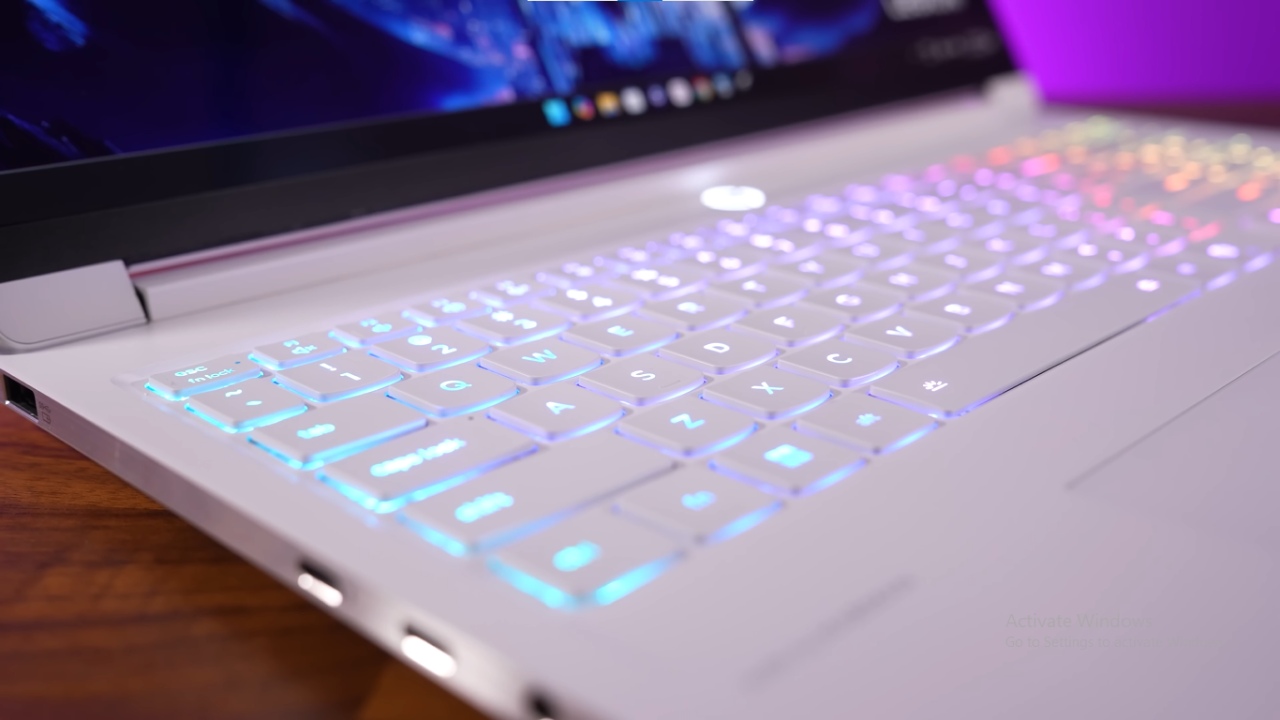
Legion 7i has RGB backlighting for each key, and the primary and secondary functions are fully lit. Holding down the function key displays the shortcuts available. Brightness adjustments include three levels, and the first six lighting effects can be cycled using the function+spacebar shortcut.
Lighting customization is available through the Legion Space software, including brightness, speed, direction, and effect arrangement. Because the keys are white, certain colors have less contrast and may be harder to see.
However, lighting can be disabled for better clarity in bright environments. The keyboard has a slightly clicky feel that many will enjoy.
The glass touchpad stands out with accurate, crisp clicks and excellent responsiveness. It surpasses many competitors in the same class.
Ports and Connectivity
Unlike the bigger Legion Pro 7i, Legion 7i still includes some rear ports, but Ethernet is missing. Thunderbolt 5 is also absent, and having Type-C ports on both sides would improve charging flexibility.
Display outputs offer options for routing through the discrete or integrated GPU. Using the dGPU improves gaming and VR performance, while using the iGPU makes the system quieter for less demanding chores.
Layout and possibility to upgrade inside
To open the laptop, you need to remove eight Phillips screws of the same length. It needs pry tools to remove the bottom cover. You'll find inside:
Battery in the front
- Two RAM slots are close to the middle.
- Primary SSD slot (right).
- Secondary M.2 slot (left).
- Wi-Fi 7 card above the secondary slot.
Neither storage slot supports PCIe Gen5. Wi-Fi speeds were notably underwhelming, even with Wi-Fi 7, likely due to the Mediatek module. There were occasional dropouts in areas where other laptops stayed stable.
The SD card slot performs worse than many competing models. Cards don't fully click in and stick out a little.
For a 16 gaming laptop, upgradeability is still really good; however, getting into the chassis is hard. It's easy to get to other brands.
Audio and System Performance
The speakers are at the front and make good sound with some bass. At higher volumes, the wrist rest may shake a little. Latency results were good in extended idle testing.
Battery and Charging
The 4-cell 84Wh battery in this year's Legion 7i is smaller than last year's 99.9Wh battery, which is probably why it is lighter. There is no automatic refresh rate switching when the battery is low; however, you can switch it quickly by pressing function+R. To save battery life, you can limit the charge to 80% and turn off fast charging.
Battery life remains similar to last year's model despite the smaller capacity, thanks to improved efficiency. Sleep power draw is one of the best tested, losing just 15% over 24 hours.
Thermals and Performance Modes
Cooling uses a standard heatsink with one shared CPU/GPU heatpipe. Air intake happens from the bottom, and exhaust vents toward the rear.
Legion Space provides Quiet, Balance, Performance, and Custom modes. Performance and Custom automatically apply GPU overclocks. Custom mode also offers Extreme settings and manual tuning for power and temperature limits. The power button color indicates the active mode.
Temperatures are fine at idle. Extreme mode remains somewhat heated even with many loads. Manually turning up the fans makes the CPU hotter because the fans are powered first. The design works best on a flat surface. Lifting the laptop can worsen the thermals.
The GPU works at the full 115W limit set by Nvidia. When there are many heavy loads on the CPU, it consumes about 55W of power. Workloads that rely solely on the CPU consume more electricity.
With a 100W Type-C charger, performance drops, and only Balance mode is accessible.
Keyboard Surface Temperatures and Fan Noise
When not in use, surfaces keep cool. Quiet mode keeps the WASD keys and wrist rests comfortable even when the computer is busy.
Balance and Performance modes make the center warmer, while the gameplay sections stay comfortable. Fan noise scales with performance mode; Performance offers a good balance of noise and FPS. Custom Extreme is significantly louder.
OLED Display Quality
The 16" OLED display comes in 165Hz or 240Hz options. It produces vivid colors, deep blacks, and impressive brightness. Lenovo advertises 500 nits, which matches measured results with HDR on and off.
The OLED panel is the same as in Legion Pro 7i and is brighter than most OLED laptops, which typically reach around 400nits. Burn-in mitigation features are built into the software, though only dark mode is enabled by default. Drawbacks include PWM flicker and a reflective glossy finish.
Response times are exceptional at under 1ms, making it the fastest OLED panel measured so far. System latency is also competitive against higher-specced laptops.
The laptop features Advanced Optimus for automatic GPU switching and a classic MUX switch for manual control. G-Sync works with Optimus disabled, while Adaptive Sync works when it's enabled.
A 1440p IR camera sits above the display with a physical shutter.
.jpg)
Gaming Performance
Tested under optimized settings, the Legion 7i performs well:
Cyberpunk 2077 (1080p Ultra): Above 100fps, 12% faster than last year’s 4070 model
Cyberpunk 2077 (1440p Ultra): Above 60fps, 19% lead over last gen
Alan Wake 2 (1080p): 1% lows show a massive 26% improvement due to newer CPU and RAM
Black Myth: Wukong (1080p High): 7% improvement over 4070
However, RTX 5070 Ti laptops deliver about 30% better performance and include 12GB of VRAM, compared to the Legion's 8GB.
Ray-traced performance improves with upscaling enabled. At native resolutions, 8GB VRAM poses limitations for long-term use.
3DMark, Creator Workloads, BIOS, and Linux
Creator performance is excellent in tools like DaVinci Resolve and Photoshop. Legion 7i is a great pick for video producers and other creative professionals, thanks to its OLED screen and SD card slot.
You can do a lot of things with BIOS options, like undervolting and overclocking. Linux compatibility isn't very good; audio, Bluetooth, brightness adjustments, and visual defects don't work.
Value and Price
At the time of the evaluation:
- RTX 5060 model: $1870
- RTX 5070 model: $2180
Prices are high because computers that are similar or better can cost the same amount. The Legion 7i, on the other hand, is more about high-end portability and build quality than getting the best performance for the money. Sales make things far more valuable, and prices have dropped significantly in the past.
Final Thoughts
Lenovo Legion 7i is a high-end, portable gaming laptop that has improved significantly this year. The OLED screen, improved design, reduced weight, and great performance make it a great choice for anyone looking for a high-end 16 gadget.
Some of the problems include the sharp front edge, the RTX 5070's limited 8GB of VRAM, the lack of Thunderbolt 5, the inferior Wi-Fi performance, the hard-to-reach chassis, and the smaller battery. Still, the battery life is good thanks to efficiency improvements, and the overall performance remains great.
Legion 7i is a good pick for travel, making content, and playing high-quality games. Those who prioritize VRAM or maximum performance may prefer the larger Legion Pro 7i or other thicker models.
Also, check our other NVIDIA articles below:
- NVIDIA GeForce RTX 5080 Review (2025): Still A 4K Gaming Powerhouse?
- NVIDIA RTX 5070 Review: Mid-Range Muscle or Marketing Hype?
- RTX 5070 Ti Review: Performance, Thermals & Power Efficiency Tested
- ASUS GeForce RTX 5090 LC Liquid Cooled GPU Review: Unmatched Silence & Speed
- MSI GeForce RTX 5090 32GB SUPRIM SOC Review: Power Efficiency, Cooling, and Gaming Performance
- INNO3D RTX 5060 Ti 16 GB X2 Review: Gaming Benchmarks, Temps, and Power Efficiency
- HP Omen 45L Review: RTX 5090 Performance, Thermals, and Value Analysis
- ASUS TUF Gaming GeForce RTX 5060 Ti Review: DLSS 4, Power Efficiency, and Gaming
- ASUS Prime RTX 5060 Ti OC 16GB Review: DLSS 4, Ray Tracing, & Thermals Tested
- NVIDIA GeForce RTX 5060 Review: Specs, Gaming, and Cost per Frame
- MSI GeForce RTX 5090 GAMING TRIO OC Review: A Monster Power GPU
Senior Editor, NoobFeed
Gaming Hardware Updates
No Data.