
ROG Xbox Ally X Dock Mode: Performance and Optimization Guide
Dock mode enhances sustained performance by utilizing higher power limits and stable cooling for consistent gameplay output.
Hardware by Masaru Hoshino on Oct 27, 2025
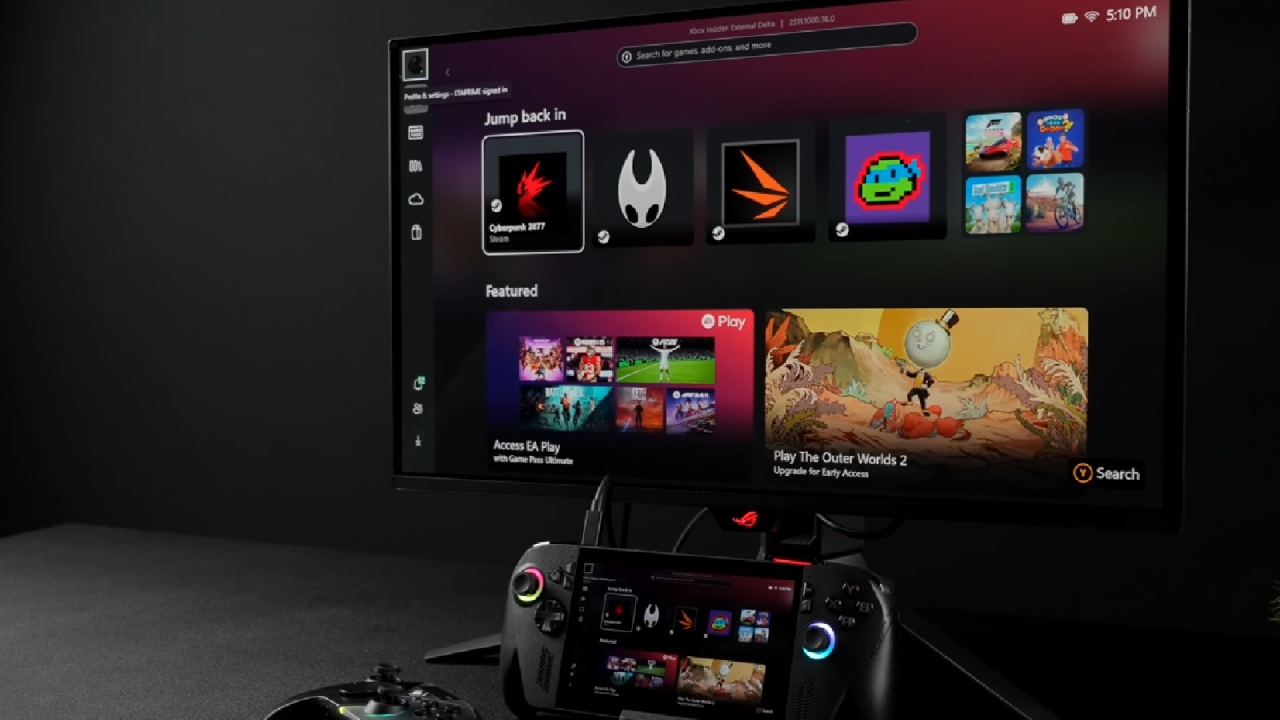
ROG Xbox Ally X has drawn a lot of attention since its launch, especially regarding its dock mode performance. Many users have been curious about how much more power and stability can be achieved when docking this handheld gaming system.
With the new Windows full-screen experience for handhelds, performance has improved significantly, making gaming on a larger display smoother and more enjoyable.
.jpg)
Understanding Dock Mode and Setup
When switching to dock mode, the biggest advantage is that we no longer need to worry about battery life. The system typically runs while plugged into a power source, allowing for a higher sustained power draw.
Connecting to an external monitor is simple, especially if the monitor supports USB Type-C video input. However, if that's unavailable, adapters or affordable third-party docks, like those designed for the Steam Deck on Amazon, work just as well.
In dock mode, performance tuning becomes much easier because we can take advantage of higher TDP (Thermal Design Power) settings through Armoury Crate. The ROG Xbox Ally X uses the AMD Ryzen AI Z2 Extreme APU with 24GB of system memory, operating at up to 8000 MT/s. Out of the box, it dedicates 8GB to the integrated GPU. Still, we can increase it to 10GB to improve VRAM allocation for games that demand more graphical resources.
Adjusting Performance Through Armoury Crate
We may change the TDP parameters and choose from a number of performance modes using Armoury Crate. You can choose from preset modes like Silent, Performance, and Turbo, or you can use the Manual option to make your own settings.
In manual mode, the FPPPT setting can go up to 55W for 10 seconds, the SPT setting can stay at 45W for up to 2 minutes, and the SPL setting can stay at 35W. These numbers tell you how long the CPU and GPU can run at a higher power level before going back to a lower one.
The Z2 Extreme works well at lower TDPs, but running it at about 45W can make a big difference in performance, especially at higher resolutions.
Also, controlling the fan is quite important here. When running at high wattages for a long time, more heat is produced. To keep performance consistent, we need to change the fan curves.
Increasing VRAM Allocation
In Armoury Crate, we may change the GPU parameters to give VRAM from 0.5GB to 16GB. Setting VRAM to 10GB gives you a balanced setup that can handle demanding games while still having ample system memory for multitasking. This is because the system has 24GB of shared memory.
Using third-party software to unlock a sustained 45W TDP
Armoury Crate does a good job at managing TDP defaults, although keeping a steady 45W output can be hard because of thermal and time-based limits. To maintain this level, we can use third-party software such as the Universal x86 Tuning Utility. This application allows setting APU power limits manually, locking the fast, slow, and sustained power limits all at 45W.
To get the most stability and output from this program, set the AMD Boost Profile to Performance, the Windows Power Mode to most Performance, and the ASUS Power Profile to Turbo. ASUS has tweaked these profiles so that power is smartly shared between the CPU and iGPU for balanced results.
After making these changes, a stress test shows that the 45W TDP stays consistent and doesn't drop with time. This arrangement makes sure that performance stays steady during longer game sessions instead of changing based on power limits.

Real-World Gaming Performance
When the system is locked at 45W, gaming performance gets a lot better in a number of demanding games.
Cyberpunk 2077 runs at 1080p on medium settings with FSR 3 set to quality, reaching mid-80s FPS with frame generation enabled. This RDNA 3.5 iGPU handles FSR 3 efficiently, delivering smoother gameplay than previous generations.
Mortal Kombat 1 performs excellently at 1080p medium settings with FSR quality mode, easily maintaining a stable 60FPS. Fighting games like Street Fighter 6 also perform well, hitting 60FPS at high settings with no issues.
Spider-Man 2 benefits from frame generation to stay above 60FPS at 1080p medium. Without it, performance would drop unless resolution is reduced below 720p, making FSR scaling a necessity.
Red Dead Redemption 2, at 1080p with a high-medium mix and FSR balanced, averages around 76FPS. The game's complex settings system allows plenty of tweaking for optimized performance.
Borderlands 4 shows some inconsistent performance, with noticeable visual artifacts from frame generation and occasional sound issues. At 1080p low with frame generation, performance stays reasonable, but optimization issues persist.

When tested at 1080p medium with FSR quality, Marvel Rivals doesn't do very well, averaging less than 60 FPS. The Z2 Extreme iGPU usually works better, which could mean that there are problems with recent game patches or optimizations.
Finally, Forza Horizon 5 shows that it is really well optimized. At 1440p medium with no scaling, the game runs smoothly at 80FPS. The game's engine is so good that it keeps up even on high settings.
Final Thoughts
ROG Xbox Ally X's dock mode unlocks more potential by doing rid of battery limits and letting the system run at a greater TDP for longer. Pushing the system to 45W gives it a lot of extra power without making it less stable, especially when it is cooled and VRAM is used properly.
While it still doesn't reach the level of an Xbox Series S or X, the gains are significant enough to make docked gaming much more enjoyable.
For players who use the handheld primarily on the go, switching between lower TDP modes for battery efficiency and higher docked modes for power is an ideal setup. With tools like Armoury Crate and Universal x86 Tuning Utility, achieving smooth and optimized docked performance on the ROG Xbox Ally X is easier than ever.
Also, check our other Handheld articles below :
- ASUS ROG Ally X Handheld Review: Double the Battery, Double the Comfort
- Nintendo Switch 2 Vs. Original Switch 1: A Full Comparison
- How To Connect A Camera And Join Voice Chat With Nintendo Switch 2
- Nintendo Switch 2 Review: Handheld Performance, Features & Value Breakdown
- ROG Xbox Ally X Vs. ROG Ally X: Display, Battery & Controls
- ASUS ROG Ally X vs. Steam Deck OLED: Display, Battery & Gaming Benchmarks
- MSI Claw 8 AI+ Review: Display, Controls & Gaming
- Nintendo Switch 2 vs. Steam Deck OLED: Gaming, Performance, Battery, Display and Value
- PlayStation Portal Review: Remote Play, Cloud Streaming & Travel Gaming
- PlayStation Portal vs. Lenovo Legion Go: Best Portable Gameplay
- Cyberpunk 2077 Patch 2.3 FPS Test on MSI Claw 8 AI+
Editor, NoobFeed
Gaming Hardware Updates
No Data.