
Xbox Ally X Overview: Performance, Design, and Software in a Modern Handheld PC
A refined handheld gaming PC blending Xbox software focus with ASUS hardware design for flexible portable and docked play.
Hardware by Nahe Yan on Jan 22, 2026
Handheld gaming PCs have changed the way people play video games. Steam Deck and Nintendo Switch set the bar high from the start. Since then, numerous businesses have launched their own versions with varying designs and performance ambitions. With the Ally series, ASUS made a solid start.
With Ally X, they improved their approach by addressing problems that emerged early on. ROG Ally X was changed after working with Xbox. It combines design and software concepts from both companies to create a portable that showcases both companies' values while still being a Windows-based gaming PC.
.jpg)
Design, Identity, and Comfort
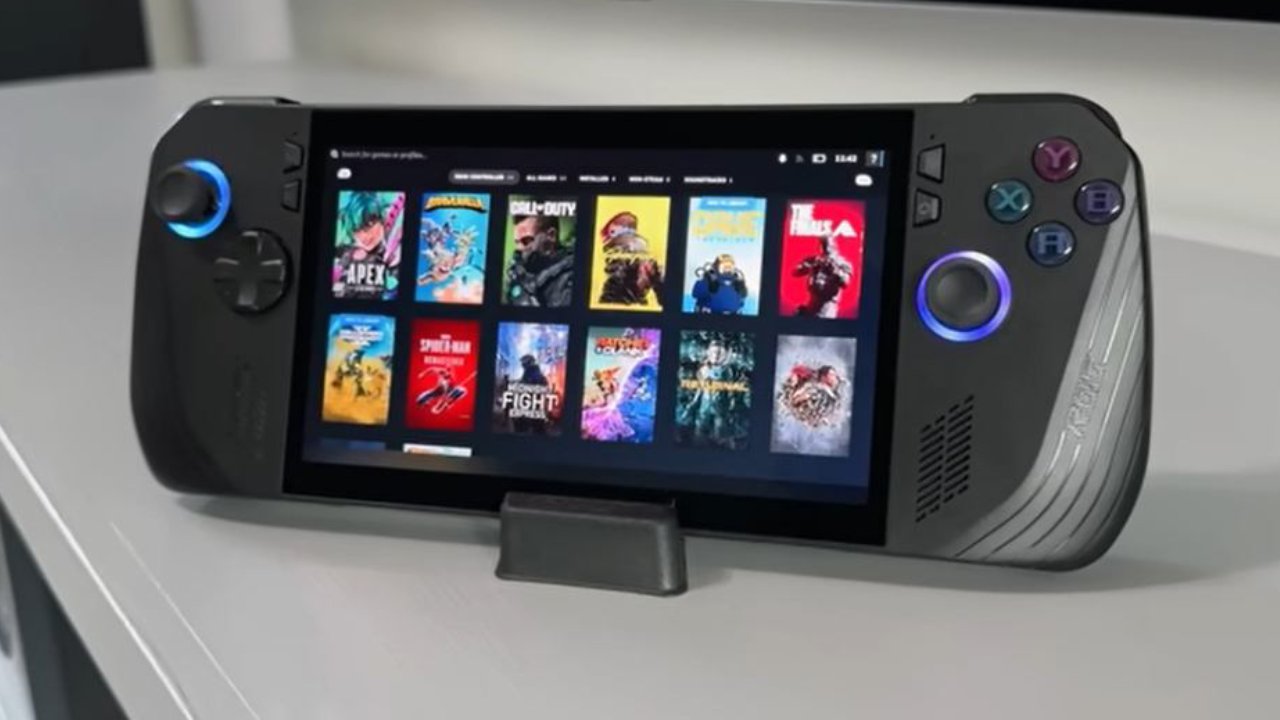
Xbox put a lot of focus on establishing a distinct identity, leading to design changes that were easy to spot. Instead of the white finish on the lower-spec variant, the Xbox Ally X has an all-black finish. Both firms' logos appear on the grips and the back; the RGB lighting is only around the analog sticks. We can switch off this light to reduce distractions and conserve battery life.
The body is thicker than it was in earlier iterations, which changes how it feels in your hands. Some people might prefer the older Ally because it feels thinner, while others might prefer the more grip. We fall somewhere between those two views, but we lean toward the added ergonomics. Long sessions of RPGs or single-player action games are easy to handle, and even long play sessions are still comfortable. External controllers still make more sense for competitive games, but it depends on what you like.
Comfort During Long Sessions
The configuration of the buttons and sticks remains the same, with domed face buttons and joysticks comparable to those on older versions. There are two customizable buttons on the back, but we use the new Xbox button on the front more often. Using third-party cases makes things much more comfortable over prolonged periods because they give grip and stability without changing the main layout.
Audio, battery, and practical limits
Some parts inside the body are still the same, even though it is bigger. The speaker arrangement is mostly the same as previously, with only a few little changes. The battery still has 80Wh of capacity, and the software is optimized for efficiency rather than making major hardware changes. You should anticipate playing for about two hours in hard games, but you can play for longer in easier games.
Power draw, heat, and operating systems are still problems for handheld gaming PCs. Even as efficiency has improved, long sessions of intensive gaming without being plugged in are still not possible without making some sacrifices.
Display Options and Trade-Offs
The 7-inch 1080p screen can handle up to 120Hz, but it's not OLED, and the edges can be seen. High frame rates, like 120 Hz, are not often used when playing on the go because of low power. The screen feels like it does with older Ally models, which is comforting rather than new.
AMD Hardware and Performance
Xbox Ally X is powered by the AMD Ryzen AI Z2 Extreme engine. The base model has a Z2A version that isn't as powerful and more closely resembles hardware from the last generation. To see clear benefits, you need the Extreme version.
There are performance gains, though small. Frame rates in AAA games stay the same even when the power settings are lower, like in Silent mode. This gives you more options based on how you use the game. It doesn't do a lot better than the old Ally X, but it's still the best choice for anyone who wants to play PC games on a handheld.
Windows integration and the Xbox Full Screen Experience
A big step forward is the Xbox full-screen mode. In this version of Windows, the Xbox game starts first, and fewer background tasks run. This makes things run faster and more efficiently. When you press the Xbox button, the main screen comes up. From here, you can get to games, settings, and third-party launchers like Steam.
Sometimes you still have to deal with Windows, like when you change the system settings or deal with text boxes. Before you can use the Xbox interface, you have to do the normal Windows setup steps. Things are easier than they used to be, but they're still more complicated than they were on a PC.
Flexibility and Customization on PCs
Using Bluetooth devices, external displays, or peripherals can make the device feel more like a small laptop. This is part of what makes it appealing. You can use it as a full PC and install emulators, productivity tools, and other programs.
Accessories are really important here. Protective cases make it easier to hold the device, built-in kickstands make it easier to play on a table, and extra controllers make some types of games better. These new features show how customisation makes the portable PC experience unique.
Power from an outside screen, AR glasses, and a gadget that is docked
It has two USB-C ports, so you can charge it and send video to a TV at the same time. If you want to watch something alone, AR glasses can be used as a second screen and send video and sound right to you. The way you use the computer changes when you take it with you because of how it's set up.
External GPU solutions like the ROG XG Mobile can boost performance when the computer is not moving. You can fully utilize higher refresh rates and connect to larger monitors with hardware like the RTX 5070 Ti Laptop Edition. This turns the handheld into a sofa console or desktop-style configuration, but it costs more.
Portability vs. Expansion
Xbox Ally X shows that many times, you need to add extras to get better results instead of just using the handheld. Things can be kept simple and easy to carry, or they can be made stronger based on your needs. This graph shows how well small PCs are doing at the moment.
Final Thoughts
This group is still changing because CPUs and apps are getting better all the time. Though Microsoft has accepted that Windows has bugs, people are still interested in AMD hardware. This shows that Microsoft wants to make Windows better in the future. It's pretty easy for me to play games on handheld screens, external displays, and wearable tech now that I think about it.
With the Xbox Ally X, you can finish games and keep track of a lot of them on the go. A few years ago, you couldn't play PC games in some places. Now, you can play on a bigger screen, on the gadget itself, or through glasses.
Also, check our other articles below :
- ASUS ROG Ally X Handheld Review: Double the Battery, Double the Comfort
- Nintendo Switch 2 Vs. Original Switch 1: A Full Comparison
- How To Connect A Camera And Join Voice Chat With Nintendo Switch 2
- Nintendo Switch 2 Review: Handheld Performance, Features & Value Breakdown
- ROG Xbox Ally X Vs. ROG Ally X: Display, Battery & Controls
- ASUS ROG Ally X vs. Steam Deck OLED: Display, Battery & Gaming Benchmarks
- MSI Claw 8 AI+ Review: Display, Controls & Gaming
- Nintendo Switch 2 vs. Steam Deck OLED: Gaming, Performance, Battery, Display and Value
- PlayStation Portal Review: Remote Play, Cloud Streaming & Travel Gaming
- PlayStation Portal vs. Lenovo Legion Go: Best Portable Gameplay
- Cyberpunk 2077 Patch 2.3 FPS Test on MSI Claw 8 AI+
Editor, NoobFeed
Gaming Hardware Updates
No Data.