
Radeon RX 9060 XT 16GB Review—FSR4 Performance Driver Issues and Gaming Benchmarks
RX 9060 XT offers solid value through consistent raster performance and lower pricing compared to similar GPU models.
Hardware by Nahe Yan on Jan 14, 2026
We had already unboxed and evaluated the RTX 5060 Ti 16GB, and while it worked well, the price in the US was still exorbitant at $439. There weren't many stocks available either. RX 9060 XT 16GB, on the other hand, has similar performance, is still in stock, and costs a little bit more. RX 9060 XT 16GB is a very appealing choice because it costs $300 less than other GPUs in the same series.
AMD 9000 series also comes with FSR4, which is said to deliver graphics almost as good as DLSS4. This post goes into great detail about the RX 9060 XT 16GB to help people choose the right graphics card for their needs before prices go up even further.
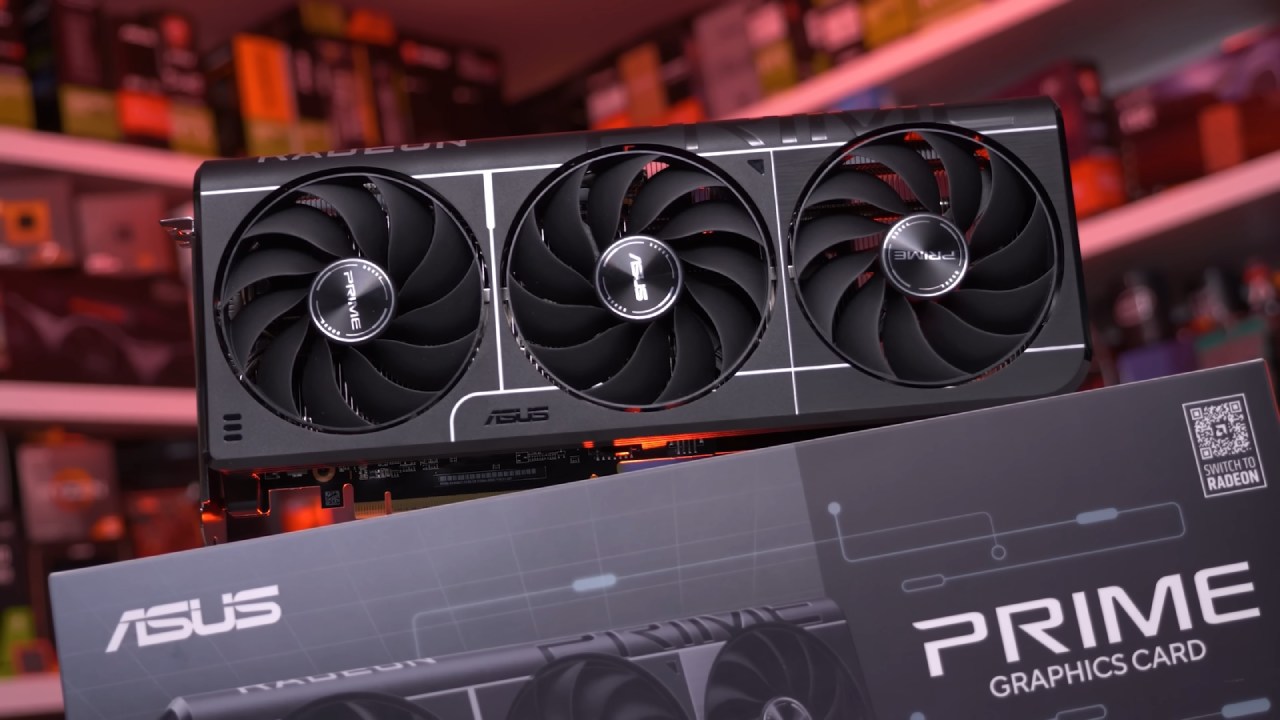
Features, Design, and Build
ASUS Prime RX 9060 XT 16 GB has three fans and a five-year warranty. The backplate is made of metal, which keeps it from drooping with time. Users can switch between Performance and Quiet settings using a physical BIOS switch. The card weighs more than 870g, so it's best to use a GPU support bracket. Its dual-slot thickness lets more air flow through small structures.
RX 9060 XT has two Display Port 2.1a connections and one HDMI 2.1 b port for connecting to other devices. This variant has three ports, unlike other 9000-series GPUs that have four. One big plus is the standard 8-pin power connector, which means you don't have to buy a separate power supply and lowers the danger of damaging the connector.
Test System and Power Performance
The test system had a Ryzen 7700 and a Ryzen 9800X3D processor, a TUF B850PLUS WIFI motherboard, and G.Skill TridentZ DDR5-6000CL28 RAM. The noise level was 35 dB(A) and the idle power use was about 70W. Power use rose to 300W during 3DMark Time Spy Extreme, yet noise levels remained the same. Temperatures stayed just above 50°C, which means the cooling worked well.
Comparison of FSR4 Image Quality
FSR4 is a lot better than FSR3. There is less visual noise, and minute details are easier to see. Carpet textures reveal fabric details more clearly, though FSR3 struggles with noise. Under FSR4, the text on vending machines looks sharper and has higher contrast.
FSR4 appears cleaner overall than DLSS4. But DLSS 4 still sharpens hair details. FSR4 hair strands look a little frizzy as you move them. Both systems deliver clear images in Monster Hunter: World, which natively supports FSR4. FSR4 does a good job of keeping everything clear while moving, while DLSS makes clothing and hair look a little clearer.
Limitations of Frame Generation
AMD's FSR frame generation only works with 2x; NVIDIA's DLSS4 can work with up to 4x. This makes it harder for AMD to improve performance. RX 9060 XT struggles to maintain stable performance in Monster Hunter: World at 4K60fps on Ultra settings, even with frame generation enabled.
AFMF universal frame generation is still the most stable solution from AMD. It doesn't have the VRAM issues that Lossless Scaling has, and it's more stable than NVIDIA's Smooth Motion. AFMF lets the RX 9060 XT exceed 144 fps in 4K in Genshin Impact without any serious issues.
Driver Stability and Suggestions
Drivers from AMD are still less stable than those from NVIDIA. Version 25.12.1 has many problems, including FSR4 not starting properly and Genshin Impact rendering at 1.0 instead of 1.5. There have been reports of Cyberpunk2077 crashing, YouTube stuttering, the screen flickering, and the system freezing. Version 25.11.1 also had similar issues.
Version 25.10.2 is the best choice because it has fewer known problems. Users should regularly check community forums to ensure their games work with the software.
A Look at Gaming Performance
Where Winds Meet at full HD native, the frame rate hovers between 70 and 80. FPS doesn't exceed 100 when the resolution is set to 70%. When you turn on FSR frame generation, roaming performance increases to about 200 fps. At 2K, the native FPS is 60, but with FSR, it can reach 140, resulting in substantial input lag. At 4K, the native FPS is about 30. It reaches 70–80 fps with FSR frame generation.
Monster Hunter Wilds' full-HD native performance barely reaches 60 fps. It reaches 70 fps with FSR Quality. It exceeds 100 fps during frame creation. At 2K, the native FPS is about 50, but FSR Balanced raises it to 60. At 4K, the native FPS decreases to 24. With FSR performance and frame generation, it gets to about 60 fps.
CS2 full HD stays over 140 fps. Heavy sequences drop to about 100fps at 2K. At 4K, the FPS is usually 60fps, but it can drop to the low 40s.
PUBG full HD can reach 200–300 fps. It reaches about 200 fps at 2K. When scoped, it averages 90 fps at 4K. Valorant runs at 800-1000 fps in full HD. It stays at about 500–600 fps at 2K. At 4K, it gets about 340 fps. The Finals average frame rate with full HD and FSR Quality is 150 fps. FPS increases by 2x when frame generation is used. At 2K, Balanced mode stays at about 100 fps. FPS stays between 60 and 80 at 4K with FSR Performance. Frame generation brings it up to about 100fps.
NarakaBladepoint The average frame rate for Full HD is 140 fps. FSR Quality gets to 200 fps. It can reach 350 fps during frame creation. Balanced mode hits 140 fps at 2K. Native performance is 50 fps at 4K, but FSR Performance can reach 80 fps. Frame generation makes it go over 144 fps.
GTAV Enhanced averages 160 fps in Full HD. It exceeds 300 fps during frame creation. At 2K, the FPS stays around 160. At 4K, the native frame rate is close to 100fps, and the frame creation rate is 170fps.
GenshinImpact full HD runs at 200 fps on the Ryzen 7700 and 270 fps on the Ryzen 9800X3D. At 2K, the frame rate hovers about 180. FPS is usually around 100 at 4K. AFMF boosts it to 170 fps with 1% lows at 150 fps.
Wuthering Waves full HD hits the 120fps limit. At 2K, the average frame rate is 80–90 fps. FSRBalanced increases it to 120 fps. At 4K, the native FPS is about 50, but FSR frame generation raises it to 120–130 fps.
Warframe runs in full HD native at 200 fps. With AFMF, it can reach 400 fps with a 3 millisecond delay. At 2K, the native frame rate is 140 fps, and AFMF raises it to almost 200 fps. At 4K, the native frame rate remains 60 fps.
Palworld full HD can go up to 100 fps. It stays above 60fps at 2K. At 4K, the frame rate dips to about 30 fps, with 1% of the time being in the single digits.

World Of Tanks 2.0 full HD runs at an average of 260 fps. It gets to 180fps at 2K. It averages 100 fps at 4K. AFMF can make it run at 144 fps, but it will take 10ms longer.
Stellar Blade full HD runs at 120 fps with 11GB of VRAM. It runs at 80 fps at 2K with 12GB of VRAM. At 4K, it goes down to 40 fps with 15GB of VRAM. It is best to have at least 12GB of VRAM.
Age of Empires IV in Full HD runs at about 130 fps. At 2K, it averages 90 fps. It keeps close to 50 fps at 4K. Escape From Tarkov full HD runs at 80-130 fps. It runs at 80–90 fps on average at 2K. It operates at 40–50 fps at 4K. When you turn on FSR and AFMF, it goes up to about 100fps.
Comparing Values
RX 9060 XT works about as well as the RTX 5060 Ti. In certain games, it is equal to or better than it. FSR4 doesn't have as much support as DLSS4, and driver stability is still a problem. GDDR6 memory is cheaper for AMD, but it also has a lower memory bandwidth than GDDR7. The VRAM temperatures are likewise higher.
RX 9060 XT has certain problems, yet it still performs well in FullHD and 2K. Many games get approximately 100 fps with FSR frame generation. Driver version 25.10.2 works well with the majority of the games we tried.
Final Thoughts
RX 9060 XT has a good hardware design and good gaming performance. FSR4 improves visuals, but there are still issues with frame generation and driver stability. Before buying a driver, users should check whether it works with their favorite games. With the right drivers, the RX 9060 XT is still a good choice for gaming at FullHD and 2K resolutions.
Also, check our other AMD articles below:
- AMD Ryzen 9 9950X3D Review: Setting The Standard For 2025 Gaming CPU
- AMD Ryzen 7 9800X3D Review: 3D V-Cache Goes God Mode with Stunning Gaming Performance
- AMD RX 9070 Performance Review: Thermals, Clocks, and Real-World FPS
- AMD Ryzen 5 7600 Review: Best Budget Gaming CPU of 2025?
- AMD Radeon RX 7800 XT Review: RDNA 3 Power For Midrange Gaming
- Sapphire NITRO+ AMD Radeon RX 9070 XT Review: The Ultimate 4K Gaming GPU
- AMD Ryzen 7 7800X3D: Delivers Gaming Performance Far Beyond Expectations
- AMD Ryzen 9 7900X Review: Powering the AM5 Era with DDR5 & PCIe 5.0
- Intel Core i9‑14900K vs. AMD Ryzen 7 7800X3D: Power Profiles & Gaming Benchmarks
Editor, NoobFeed
Gaming Hardware Updates
No Data.