
New Steam Controller Review: Features, Ergonomics, and Performance
The new Steam controller integrates advanced haptics, dual trackpads, and ergonomic design to enhance precision and comfort during gameplay.
Hardware by Masaru Hoshino on Nov 17, 2025
The new Steam controller represents a significant step forward from Valve's initial design from 2015. It has better ergonomics, inputs, and sensing technologies.
The Steam Machine controller is designed to work with the Steam Machine and is more like a typical console controller. It still features important Steam capabilities, including trackpads and configurable inputs.
Evolution From the Original Steam Controller
We immediately notice how different this controller feels compared to the original Steam Controller from 2015, which used dual touchpads instead of analog sticks. You may recall how unfamiliar that device felt, especially when asked to control a 3D camera using a touchpad. When we used the original controller, it often felt awkward and unnatural.
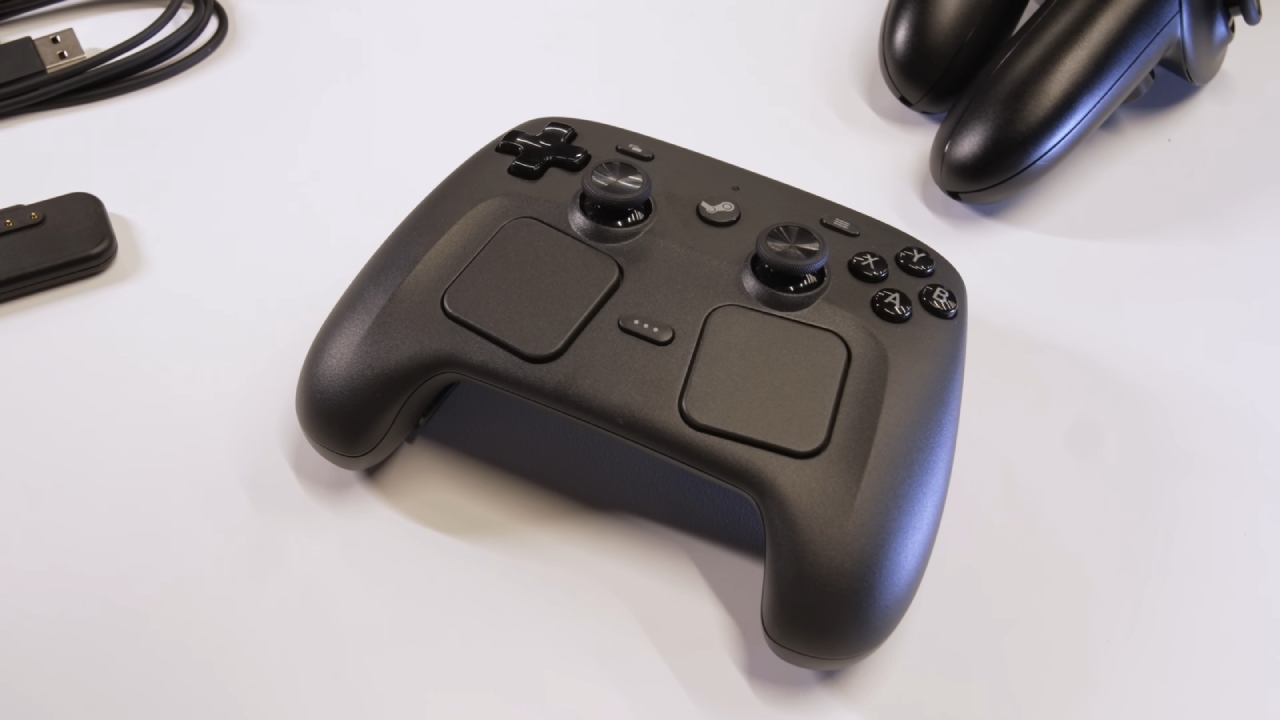
Here, we see a decade of refinement. We get dual analog sticks, proper face buttons, and dual trackpads that feel like an evolution of the Steam Deck's input system. You experience familiar control elements, but with better comfort and more intuitive placement.
Refined Ergonomics and Enhanced Input Design
We notice immediately that the ergonomics have significantly improved. Instead of the flatter body of the Steam Deck, the controller is sculpted to fit your hand naturally. You feel the dual trackpads angled slightly inward, allowing your thumbs to rest more comfortably. The sticks feel close to what you're used to on the Steam Deck, the face buttons feel similar, and the triggers provide a slightly deeper pull.
You may find the RB/LB equivalents a bit mushier compared to the Steam Deck's snappier tactility. The controller features gyro controls for motion aiming, similar to the Steam Deck, but with more flexible input combinations.
Advanced Stick Technology and Grip-Sensing Features
We appreciate the magnetic thumbsticks that utilize TMR technology, which Valve describes as an evolution of the Hall effect. You can expect better durability and smoother long-term performance compared to potentiometer-based sticks.
We also see a unique feature called Grip Sense. When your fingers touch or release the back of the controller, the sensors detect this movement. You can use this as an input modifier, such as disabling gyro aiming when you relax your grip. That means you can reposition your hands without messing up your in-game aim, which feels incredibly intuitive in practice.
.jpg)
Improved Haptics and Multifunctional Trackpads
We receive full haptic feedback in both the trackpads and throughout the controller body. The haptics feel significantly stronger and more responsive than those of the Steam Deck, offering a level of precision closer to that of HD Rumble.
When you use the trackpads for cursor-like precision—whether in strategy games, card games, or PC interfaces—you feel a stronger sense of control. The haptic response gives you tactile confirmation with every movement.
Connectivity and Compatibility Options
We connect the controller using the new Steam controller puck, a magnetic dongle that also serves as a charging attachment. A USB-C port is available for those who prefer wired charging.
You can pair the controller using the proprietary Steam wireless standard for stable, low-latency use, or fall back to Bluetooth or wired mode if needed. You can also power on the Steam Machine by pressing the Steam button, similar to wake functions on console controllers.
Utility for PC Gaming and Traditional Desktop Interfaces
We quickly notice how much this controller helps in PC games that still require occasional mouse navigation. You get the same dual trackpad precision the Steam Deck provides, allowing you to handle UI windows and menus that PC games often throw at you.
We also recognize the value of this for traditional PC titles that support controller mods. For example, in games like World of Warcraft, which many players adapt for controller use, the trackpads give you fine cursor control without sacrificing comfort or functionality.
.jpg)
Steam Machine Verified Integration
Valve plans a Steam Machine Verified program specifically for the combination of Steam Machine and Steam controller. Instead of rating generic controllers, they want to evaluate the entire ecosystem as a whole. We expect better consistency because developers can target one specific controller layout.
A Controller Built for Complex PC Environments
We find that many design choices improve usability in operating systems that may still require window navigation at times. Instead of struggling with awkward UI tasks, you can smoothly use trackpads, gyro, haptics, and back buttons to interact with menus that normally aren't designed for controllers.
Whether you're using SteamOS or gaming on Windows, we believe the controller provides a smooth and adaptable experience that bridges the gap between console-level comfort and PC-level flexibility.
Also, check our other hardware articles:
- AMD Ryzen 9 9950X3D Review: Setting The Standard For 2025 Gaming CPU
- Amazon Luna 2025 Review: Is Prime Gaming's Cloud Service Your Go-To For Casual Fun?
- AMD RX 9070 XT Review: AMD's RDNA 4 Champion for 1440p Gaming
- GeForce Now Ultimate: Ditching Your Gaming PC For Cloud RTX 4080 Power?
- NVIDIA GeForce RTX 5080 Review (2025): Still A 4K Gaming Powerhouse?
- Intel Core Ultra 9 285K Review And Performance Breakdown (2025)
- AMD Ryzen 7 9800X3D Review: 3D V-Cache Goes God Mode with Stunning Gaming Performance
- Intel Core Ultra 9 285K vs AMD Ryzen 7 9800X3D: In-Depth Gaming Performance and Benchmark Comparison
- NVIDIA GeForce RTX 5080 Super Performance In Cyberpunk 2077: Path Tracing & DLSS 4.0 Tested
- AMD Radeon RX 9070 XT In Cyberpunk 2077: Ray Tracing & FSR 4.0 Tested
- Intel Arc B580 Review: The $250 GPU Revolutionizing 1440p Gaming
- Intel Arc B570 Vs. B580: Value, Specs, And Real-World Gaming Performance
- RTX 5090 Laptop Vs. M4 Max MacBook Pro: Ultimate Raw Performance Vs. Battery Endurance
- Intel Arc b580 Vs. RTX 4060: Game Performance And Value Analysis
- RTX5090 Hell Is Us Demo 4K Ultra Benchmark: DLSS Vs. Native Performance Guide
- NVIDIA RTX 5070 Review: Mid-Range Muscle or Marketing Hype?
- Nintendo Switch 2 Review: Handheld Performance, Features & Value Breakdown
- RTX 5070 Ti Review: Performance, Thermals & Power Efficiency Tested
- Samsung Odyssey OLED G81SF Review 2025: Ultimate 32-Inch QD-OLED Gaming Monitor
- AMD RX 9070 Performance Review: Thermals, Clocks, and Real-World FPS
- AMD Ryzen 5 7600 Review: Best Budget Gaming CPU of 2025?
- AMD Radeon RX 7800 XT Review: RDNA 3 Power For Midrange Gaming
- Asus ROG RTX 5090 Astral OC Vs. Founders Edition: The 4K Gaming Benchmark
- Intel Core i5-13400F Gaming Performance: Still Worth It in 2025?
- ASUS GeForce RTX 5090 LC Liquid Cooled GPU Review: Unmatched Silence & Speed
- ASUS ROG Ally X Handheld Review: Double the Battery, Double the Comfort
- Lenovo Legion Go S Review: The Ultimate Steam Deck 2 Alternative
- Sapphire NITRO+ AMD Radeon RX 9070 XT Review: The Ultimate 4K Gaming GPU
- Alienware 16 Area 51 Review: The Ultimate 2025 Gaming Laptop
- Alienware Area-51 Review: Unmatched 4K, Thermal, and Acoustic Performance
- AMD Ryzen 7 7800X3D: Delivers Gaming Performance Far Beyond Expectations
- AMD Ryzen 9 7900X Review: Powering the AM5 Era with DDR5 & PCIe 5.0
- Intel Core i9‑14900K vs. AMD Ryzen 7 7800X3D: Power Profiles & Gaming Benchmarks
- Intel Core i9 14900K: Specs, Benchmarks, and Competitor Comparison
- ASRock Radeon RX 7800 XT Challenger OC Review: Best Price-to-Performance GPU of 2025
Editor, NoobFeed
Gaming Hardware Updates
No Data.