
2026 Handheld Reality Check: Steam Deck vs Legion Go vs ROG Ally X
Resolution, power limits, and software layers define the real handheld experience beyond benchmark numbers.
Hardware by Nahe Yan on Feb 23, 2026
Over the last several months, what started as a simple comparison of mobile gaming devices has become a broader study of how different devices affect daily use. The goal was not to get the best specs, but to see how each device works in real life.
When new gear comes out in 2026, the most important improvements aren't often on the spec sheet.
Steam Deck LCD: More Cohesion, Less Headroom
Steam Deck LCD was the first step because it let people use their existing Steam library instead of having to buy games again on a different system. It was hard to ignore when it went down to $279 on Black Friday.
Expectations were based on reality. There was no reason to think it would work better than newer gear or give perfect AAA performance at ultra settings. The goal was value. It was faith that made things happen. Games ran at their original resolution, so there was no need to scale or make trade-offs constantly. On a handheld gadget, sleep and wake worked as they should. Everything worked together, and the pattern became clear over time.
Legion OS: Balancing Resolution and Performance
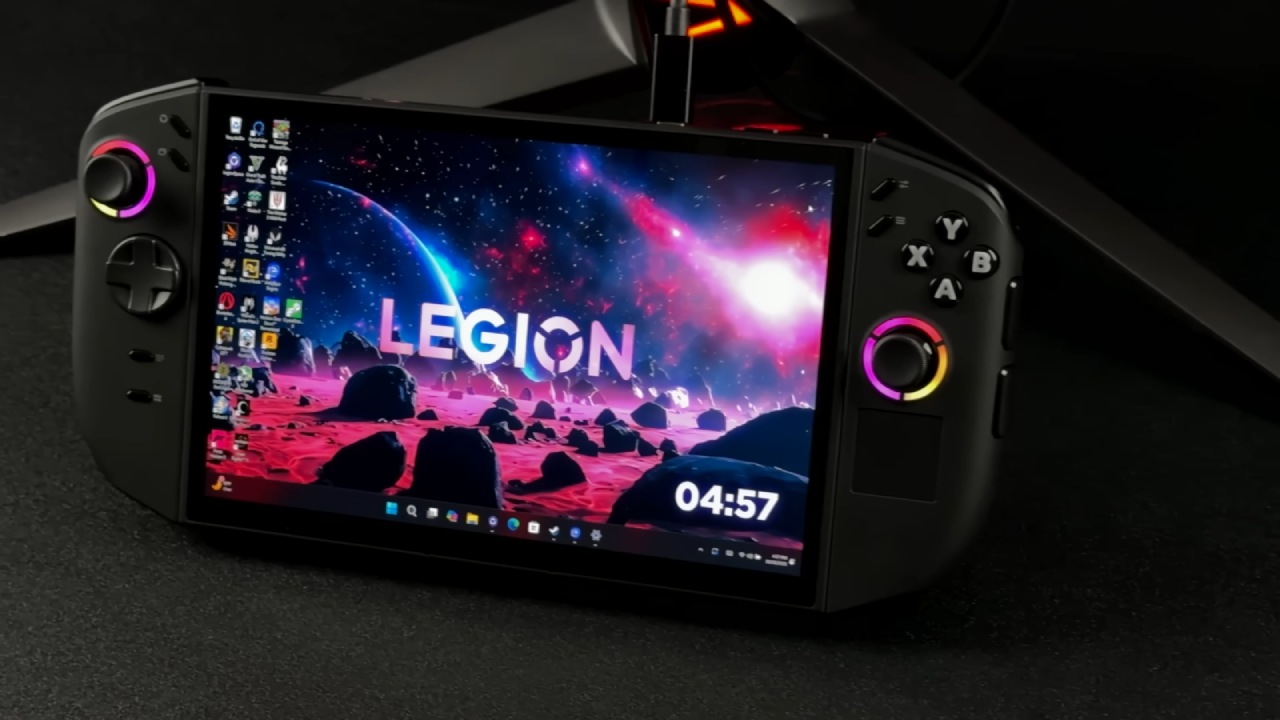
The next step was to get the Lenovo Legion Go to run SteamOS. Newer hardware should make things better on paper. It comes with a 1200p screen, increased wattage limitations, and menus and desktop mode that respond faster. That mix points to a move forward.
In real life, the experience gets more complex. When playing intensive games, the resolution often dips to 1280x800 to maintain consistent frame rates. That puts it in the same performance range as the Steam Deck. The hardware is good, but when you add a 1200p display, you have to choose between sharpness and frame rates that stay the same in more demanding games.
If the screen had been closer to 900p, the balance might have worked better with the hardware's steady output. The device still works, though. Desktop mode is easier to use. Playing docked makes sense in real life. It's easier to get around the system. Those things are important if you want a handheld that can also be a light travel machine and still work with SteamOS. But as a mobile gaming device, it doesn't always feel easier to use than the Deck.
ROG Ally X: Managing Capabilities and the Operating System
ASUS ROG Ally X changed the experiment even more. With a Z1 Extreme, 24GB of RAM, a bigger battery, and a 1080p display, it costs close to $1,000. Expectations rise in line with this.
It delivers on raw talent. When playing demanding games, the Legion can't keep up with native 1080p performance or that of other systems. It also stays silent even when it's under strain. You can measure the headroom. But the trade-offs don't go away. They move.
People stop talking about resolution compromises and start talking about the operating system. Setting up is more like setting up a small gaming laptop than taking a console out of the box. Updates are split between ASUS and Windows software. You run a full desktop operating system rather than just a gaming environment on handhelds.
By themselves, none of these things is a dealbreaker. They need to work together. Ally X doesn't try to hide that it's a PC, unlike SteamOS. If you're okay with using a handheld as a portable gaming PC, you can't get more flexible. Friction becomes more obvious if you expect things to be as easy as a console.
Where Friction Happens
A pattern is emerging across all three devices. Each one makes something better that can be measured. Steam Deck is all about balance and cohesiveness. Legion increases display resolution and makes the desktop easier to use. Ally makes things easier and more flexible.
The stats for performance improve, but the overall experience doesn't get better in a straight line. Friction doesn't go away; it only moves to a new place. On the Deck, compromises show up in the performance headroom. On the Legion, they show up in the space between panel resolution and frame rates that can be maintained over time. They are part of managing and configuring the operating system on the Ally.
When looking at handhelds this way, comparison goes beyond just strength. We start by asking where friction will have the biggest effect on us. Instead of looking for greater specifications, you start to figure out which sacrifices work for you.
.jpg)
What Really Affects Daily Use
Manufacturers will keep pushing for faster refresh rates, more powerful APUs, AI-assisted features, and bigger screens. These modifications make things more possible. Potential only makes things better if it fits how you use the gadget.
Questions become useful. How much setup do you want to do before you play? How well do you know how to use a desktop operating system? How often are you willing to change the resolution or settings to meet a performance goal?
Steam Deck's balance might be enough for you if you mostly play independent games and like things to be predictable. Legion has a bigger screen and improved desktop usability with SteamOS, but there are some trade-offs. Ally X gives you that independence if you want the most headroom and flexibility and don't like managing Windows.
Final Thoughts
Newer hardware does make things better. It doesn't immediately make things better. Upgrading specs makes things better, but experience only improves when that potential aligns with how you use it.
In 2026, there is no perfect handheld. The category is defined by trade-offs. It's not about picking the strongest machine. It's about knowing which tradeoffs are good for everyday use. When seen in this way, the market becomes clearer, not because one gadget triumphs, but because priorities are set.
Also, check our other hardware articles:
- AMD Ryzen 9 9950X3D Review: Setting The Standard For 2025 Gaming CPU
- Amazon Luna 2025 Review: Is Prime Gaming's Cloud Service Your Go-To For Casual Fun?
- AMD RX 9070 XT Review: AMD's RDNA 4 Champion for 1440p Gaming
- GeForce Now Ultimate: Ditching Your Gaming PC For Cloud RTX 4080 Power?
- NVIDIA GeForce RTX 5080 Review (2025): Still A 4K Gaming Powerhouse?
- Intel Core Ultra 9 285K Review And Performance Breakdown (2025)
- AMD Ryzen 7 9800X3D Review: 3D V-Cache Goes God Mode with Stunning Gaming Performance
- Intel Core Ultra 9 285K vs AMD Ryzen 7 9800X3D: In-Depth Gaming Performance and Benchmark Comparison
- NVIDIA GeForce RTX 5080 Super Performance In Cyberpunk 2077: Path Tracing & DLSS 4.0 Tested
- AMD Radeon RX 9070 XT In Cyberpunk 2077: Ray Tracing & FSR 4.0 Tested
- Intel Arc B580 Review: The $250 GPU Revolutionizing 1440p Gaming
- Intel Arc B570 Vs. B580: Value, Specs, And Real-World Gaming Performance
- RTX 5090 Laptop Vs. M4 Max MacBook Pro: Ultimate Raw Performance Vs. Battery Endurance
- Intel Arc b580 Vs. RTX 4060: Game Performance And Value Analysis
- RTX5090 Hell Is Us Demo 4K Ultra Benchmark: DLSS Vs. Native Performance Guide
- NVIDIA RTX 5070 Review: Mid-Range Muscle or Marketing Hype?
- Nintendo Switch 2 Review: Handheld Performance, Features & Value Breakdown
- RTX 5070 Ti Review: Performance, Thermals & Power Efficiency Tested
- Samsung Odyssey OLED G81SF Review 2025: Ultimate 32-Inch QD-OLED Gaming Monitor
- AMD RX 9070 Performance Review: Thermals, Clocks, and Real-World FPS
- AMD Ryzen 5 7600 Review: Best Budget Gaming CPU of 2025?
- AMD Radeon RX 7800 XT Review: RDNA 3 Power For Midrange Gaming
- Asus ROG RTX 5090 Astral OC Vs. Founders Edition: The 4K Gaming Benchmark
Editor, NoobFeed
Gaming Hardware Updates
No Data.