
AMD RX 9060 XT VRAM Comparison: Performance Differences Between 8GB and 16GB
RX 9060 XT 8GB and 16GB cards offer improved microarchitecture and FSR performance compared to previous generation Radeon GPUs.
Hardware by Tanisha Aria on Nov 28, 2025
Recently, many people have been talking about how current graphics cards don't have enough 8GB of VRAM. Budget-conscious gamers are in a tough spot: the $5060, which costs $300, doesn't have the 12GB of the 3060, but the $5060 Ti, which costs $430, does.
A lot of people have to look at cards from earlier generations on the resale market. With the RX 9060 XT, which comes in 8GB and 16GB versions and costs about $80 less than similar products from competitors, AMD quietly released a possible answer.
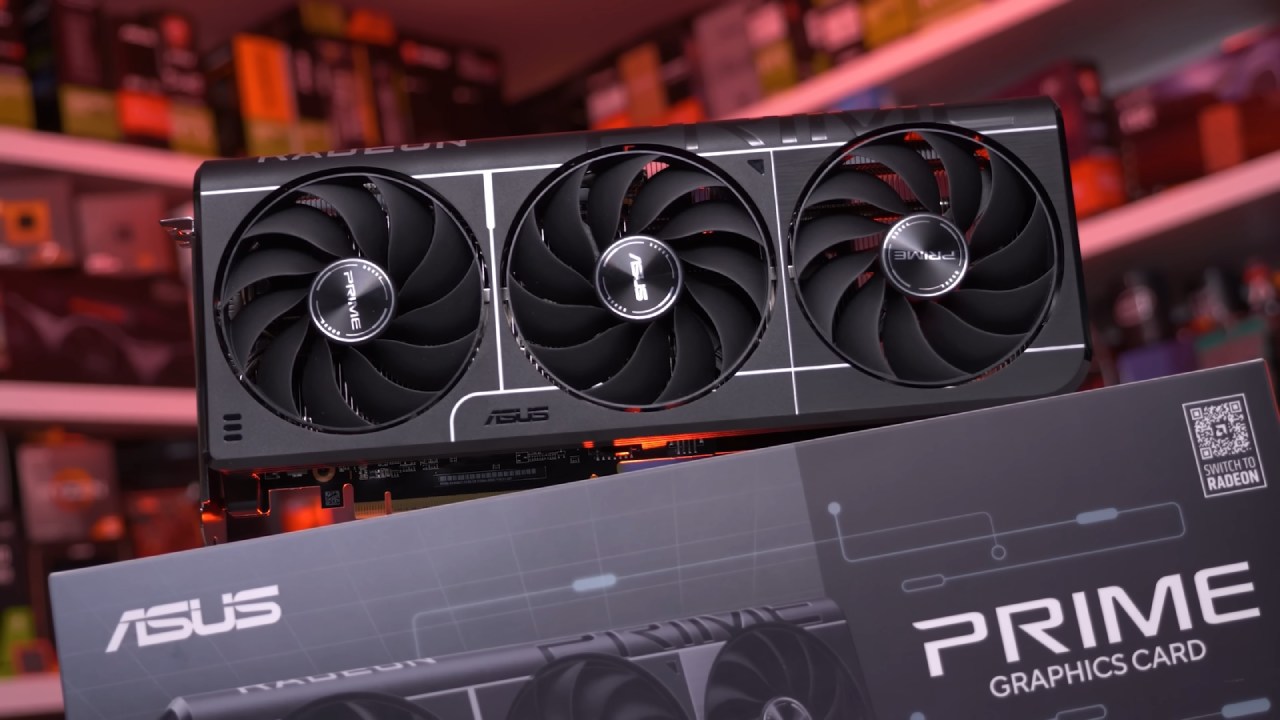
The new RX series cards offer better FSR performance, improved encoding, and updated microarchitecture, so these are not old cards. Can the new RX cards really compete with their rivals? Let's look at it.
RX 9060 XT Specifications
It is very important to understand the names. In the previous generation, there were the RX 7600 and 7600 XT. They both used the same chip, but the VRAM was 8GB or 16GB, and the maximum clock and power were slightly different. The new generation has both 8GB and 16GB models that end in "XT."
Their frequency ceilings are the same, but their power limits are different. It costs $20 to $30 more than the last model. The number of cores and blocks didn't change, but the speeds increased, and the microarchitecture improved.
The new cards also feature full PCI Express lanes, increasing bus capacity by 4x. The VRAM frequency is higher, but it is still GDDR6.
Only sold in China, the RX 9070 GRI with 12GB is much more expensive and hard to find elsewhere. It also has 1.5 times as many cores, blocks, and Infinity Cache. Still, the core and memory speeds are lower, so the performance boost is only 50%.
Test Setup and Competitors
We looked at six video cards: the 9060 XT in 8GB (Asus Prime OC) and 16GB (Sapphire Pulse OC) versions, two 5060 Ti models (Asus Megalodon OC), and an RX 7600 PowerColor Fighter that came before it. The test machine had an advanced 22-phase VRM and Ryzen 79800X3D on an Asus ROG Crosshair X870 Apex.
It could power a 16-core CPU. There were four SATA ports and five M.2 slots for storage, with three supporting PCIe 5.0. The motherboard offers many features, including resizable BAR, anti-lag, USB4, and various overclocking options.

Synthetic Benchmarks
9060 XT and 5060 Ti both performed about the same in Fire Strike Ultra and Time Spy Extreme. In general, Nvidia was better, with cards like the 9070 GRE doing about 40% better than the XT cards.
The score gain from one generation to the next ranged from 33% to 49%. In Blender scores, Nvidia cards performed better than Radeon cards, and Radeon cards sometimes ran out of VRAM in large AI projects.
PCIe speed limits hurt the RX 7600's performance and caused it to crash in the middle of rendering. GeForces still had a 7% edge over the 9070 JRI and a 20% edge over slower RX cards.
The results for Adobe Photoshop and Premiere were not identical. The 9060 XT was often behind Nvidia in driver performance, while Nvidia always did better across most codecs.
With the new RX cards, OBS could reach up to 300 frames per second in 4K using H. 264. But only 75 frames per second with H. 265.
Power use stayed the same across all monitors, with only small differences between 8GB and 16GB types. Temperature control worked well most of the time, but the small RX 7600 needed the fan to be turned on every once in a while.
Gaming Performance: Quad HD and Full HD
On the 9060 XT at Quad HD, all options were set to 60 FPS or higher. When scaling up was needed, FSR3 or FSR2 was used. The 16GB 9060 XT always got over 60 FPS in Cyberpunk 2077, but it was a little slower than the Ti models.
The 8GB version stayed up and showed little difference. Full HD showed greater improvements for the 60-series, while lower resolutions achieved better results because they had fewer pixels to work with. When devices like mice or gamepads were used with Radeon cards, frame rates would sometimes go off.
This is The Elder Scrolls IV: Oblivion. Stressing out the RX 7600's 8GB of VRAM in Remastered made it perform worse. 16GB 9060 XT and the 12GB JRI maintained their performance.
5060 Ti used less memory and had fewer drops. Similar trends were seen in Spider-Man 2 and Silent Hill 2: 8GB Radeons sometimes stuttered, but bigger VRAM kept FPS smooth.
Alan Wake 2 and Monster Hunter: World showed how VRAM could be used more efficiently. 8GB versions worked fine, but future games may test them even with low-quality graphics.
The difference between an 8GB and a 16GB RX 9060 XT across 13 games, excluding Assassin's Creed (which can't be played on a 7600), was very small. This shows that 8GB is enough for most current games. Improvements from one generation to the next often went over 50%. PCIe speed helped, but the RX chip itself showed clear performance gains.
Ray Tracing Performance
Doom: The Dark Ages got 70% better from one generation to the next. The 9060 XT and 5060 Ti both had enough VRAM. Cyberpunk 2077, with full ray tracing, had small drops on 8GB Nvidia, but 16GB RX did 15% better than 8GB.
Spider-Man 2, Silent Hill 2, and Alan Wake 2 all followed the same pattern, and the new RX generation did a good job with ray tracing. Assassin's Creed Shadows ran 34% faster on the 16GB 9060 XT than on the 8GB version, but the 8GB Nvidia version didn't change much.
Average ray tracing data from several games showed that 8GB models had little loss, but 16GB models had a stronger buffer for situations that used a lot of VRAM.

PCI Express Considerations
If you stick to the VRAM limits, using older PCIe versions (3.0 vs. 5.0) doesn't have much of an effect on FPS in most games. For games that use a lot of VRAM, like Spider-Man, lower PCIe versions cause significant FPS drops, so the graphics settings need to be adjusted to keep the frame rate up.
Overclocking and Undervolting
Undervolting cut power use by up to 46W with almost no loss in FPS, but temps did rise a little. Overclocking increased FPS by about 6-8%, which isn't a huge increase. Some games on Nvidia cards ran better when the clock speed was increased by 11-13%. Undervolting usually makes things more efficient without significantly lowering speed.
Final Thoughts
8GB RX 9060 XT and 5060 Ti run very similarly to the 16GB versions in most tests. For most new games, 8GB is enough. But because VRAM is limited, background apps and graphics settings need to be carefully monitored to ensure FPS doesn't drop, slow down, or crash.
If you pay more for 16GB, you'll get more stable performance, better support for future updates, and greater control over high-quality textures, ray tracing, and recording. For about $80 less, the RX 9060 XT is a good deal, but the market price often erodes that benefit.
The new RX series offers many significant improvements over the previous generation across microarchitecture, encoding, and ray tracing. However, the best way to decide what to buy depends on your income, workload, and gaming habits.
Also, check our other AMD articles below:
- AMD Ryzen 9 9950X3D Review: Setting The Standard For 2025 Gaming CPU
- AMD Ryzen 7 9800X3D Review: 3D V-Cache Goes God Mode with Stunning Gaming Performance
- AMD RX 9070 Performance Review: Thermals, Clocks, and Real-World FPS
- AMD Ryzen 5 7600 Review: Best Budget Gaming CPU of 2025?
- AMD Radeon RX 7800 XT Review: RDNA 3 Power For Midrange Gaming
- Sapphire NITRO+ AMD Radeon RX 9070 XT Review: The Ultimate 4K Gaming GPU
- AMD Ryzen 7 7800X3D: Delivers Gaming Performance Far Beyond Expectations
- AMD Ryzen 9 7900X Review: Powering the AM5 Era with DDR5 & PCIe 5.0
- ASRock Radeon RX 7800 XT Challenger OC Review: Best Price-to-Performance GPU of 2025
- Intel Core i9‑14900K vs. AMD Ryzen 7 7800X3D: Power Profiles & Gaming Benchmarks
Contributor, NoobFeed
Gaming Hardware Updates
No Data.