
Asus XG27AQWMG Review: Tandem OLED Delivers Brighter 280hz Gaming Performance
Tandem OLED technology enhances brightness, color volume, and longevity in a 27inch 1440p 280hz gaming monitor
Hardware by Masaru Hoshino on Feb 21, 2026
At first glance, this may look like every other OLED gaming monitor on the market, but it represents one of the most interesting developments in monitor technology in quite a while.
After reviewing monitors for over a decade and designing custom tools to test them, something like this is genuinely exciting. The Asus XG27AQWMG introduces a tandem OLED panel, and that alone makes it stand out.
What Is Tandem OLED?
We already know what OLED means: organic light emitting display. Each tiny pixel is an LED, or multiple LEDs, that emits its own light instead of relying on liquid crystals to block light from a single backlight. The “tandem” part is the real innovation here.
This panel is made up of four different layers of LEDs or emissive elements stacked together, working in tandem. Previous W OLED panels used three layers—two blue and one yellow in the middle. By splitting that yellow layer into separate red and green layers, there are now more layers producing more light with less power.
To put it simply, if a single layer has to produce a certain brightness, it must pump in a lot of power, generating more heat and causing more damage over time. With multiple layers sharing the load, each one uses less power, resulting in less heat and less long-term degradation. That is a significant improvement.
Tandem OLED is an LG technology, and since OLED manufacturing is an incredibly complex process with very few panel makers in the world, this monitor still uses LG’s W OLED pixel layout.
Pixel Layout and Text Clarity
Unlike QD-OLED panels that use an RGB stripe layout, W OLED panels are made up of red, green, blue, and white subpixels. That white subpixel is unusual, and Windows does not always handle it well. On text especially, it can sometimes feel slightly uncomfortable to look at.
There is still some color fringing, although it does appear improved over previous W OLED panels. If you are particularly sensitive to text clarity, you may notice it. If not, it likely will not bother you much.
Color Performance and Brightness
The XG27AQWMG claims a 25% larger color volume thanks to the tandem OLED design. That translates to richer, more vibrant colors and, in theory, more granular color transitions. Asus claims nearly 100% coverage of the DCI-P3 color space, and testing confirms that. It also reaches 82% of the REC2020 color space, about 1% lower than most QD-OLED panels tested, which is not a major difference.
Color accuracy is excellent, with an average deltaE of under 2. While there is no calibration report included in the box, visually the display looks vibrant, sharp, and incredibly rich.
Brightness is another major improvement. Asus claims 15% more brightness than a non-tandem OLED. In testing, it reached highs of 530nits with only 1/9th of the screen lit.
However, like other W OLEDs, it uses an Adaptive Brightness Limiter (ABL). The screen can ramp up to around 500nits, but it quickly cuts back to protect the panel. Brightness also depends on how much of the screen is lit. While 530nits is achievable in a small window, lighting up 50% of the screen reduces brightness to around 350nits.
You can disable ABL by enabling uniform brightness mode, but that caps brightness at around 320nits regardless of content. In HDR mode, the monitor can reportedly hit up to 1500nits on very small highlights, though that may impact long-term lifespan.
Response Times and Gaming Performance
Response times are functionally instant. Testing tools struggle to keep up with how fast this panel transitions. There are no sync issues between layers; everything feels perfectly aligned.
Latency is excellent, making the gaming experience top-tier. The combination of speed, infinite contrast, and vibrant color produces a brilliant range. Dark scenes reveal details that would be lost on an IPS panel. If you are gaming competitively or immersively, you will appreciate just how smooth and responsive this display feels.
OLED-Specific Features
There is an OLED anti-flicker setting designed to reduce flickering that can occur with adaptive sync, especially in darker scenes. Enabling this on medium or high appears to limit the adaptive sync range from 60hz-280hz down to approximately 144hz-280hz. There is also a subtle cyclical pulsing effect across frames, indicating that the feature is actively modifying brightness behavior.
The OLED care settings are extensive. A new addition is the Neo Proximity Sensor, a laser distance module built into the lower chin. It detects whether you are in front of the monitor and blanks the screen after a set time if you are not. You can customize both distance and timing. It blanks the display without fully turning it off, so your PC does not react as if the monitor was disconnected.
Other protective features include pixel orbiting, pixel refresh cycles, and both whole-screen and selective element dimming. Most of these are enabled by default. The monitor comes with a 3year warranty, and Asus claims a 60% longer lifespan compared to previous designs, although long-term real-world data on tandem W OLED panels is still limited.
.jpg)
Design and Connectivity
From the front, it looks like a typical ROG gaming monitor, with thin bezels and an illuminated logo integrated into the chin bar alongside the proximity sensor. The stand is fully adjustable for height, tilt, swivel, and rotation into portrait mode in both directions.
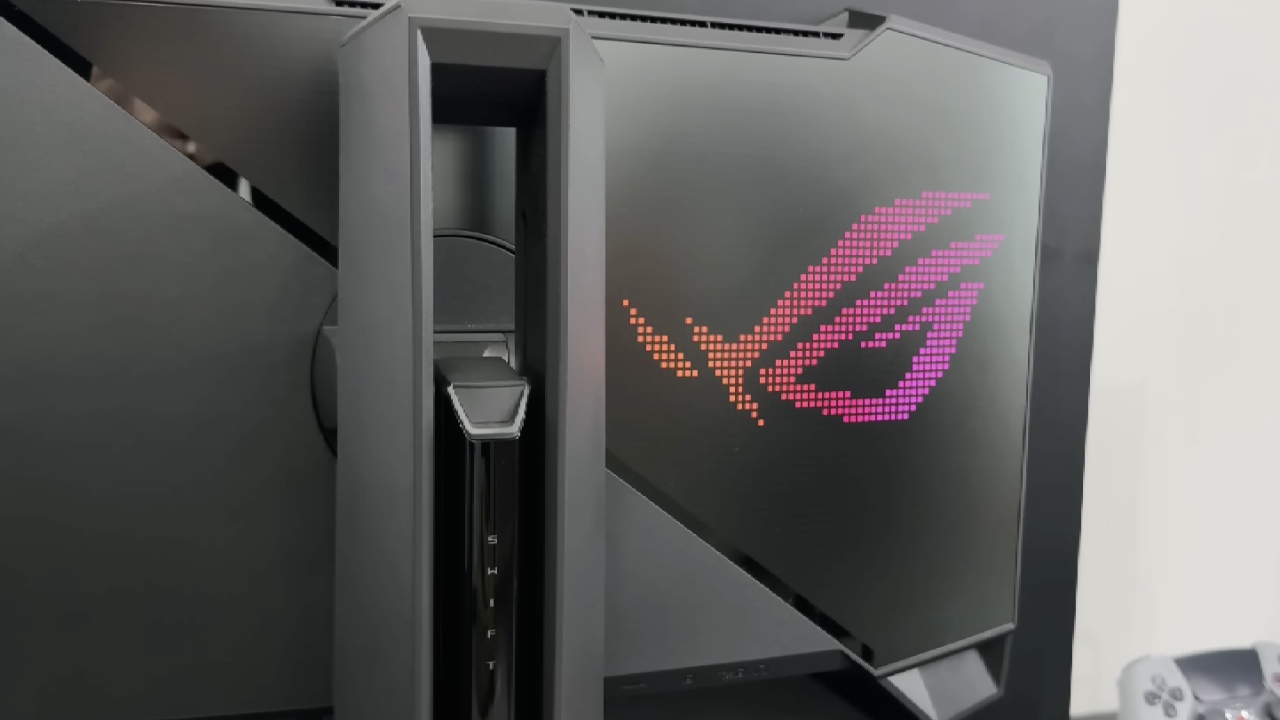
At the back, the design leans heavily into a gamer aesthetic, including RGB lighting. Connectivity includes 2 HDMI2.1 ports, 1 DisplayPort1.4 with DSC, and a 2port USB3 hub. The on-screen display controls are located on the back of the chin bar, and the menu provides full access to performance and OLED care settings.
Final Thoughts
The tandem OLED panel is undeniably an upgrade over older standard W OLED panels. Whether it is preferable over QD-OLED is still debatable, especially considering text clarity and long-term burn-in data.
At around $520, it undercuts LG’s equivalent 27inch 1440p 280hz tandem OLED monitor by $130 while using the same panel. That positions it as strong value. However, alternatives like AOC’s 240hz QD-OLED models are available for around $380, offering better text clarity and proven burn-in resistance, albeit with lower peak brightness.
If you specifically want a tandem OLED panel, this monitor is a compelling and competitively priced way to get it.
Also, check our other hardware articles:
- AMD Ryzen 9 9950X3D Review: Setting The Standard For 2025 Gaming CPU
- Amazon Luna 2025 Review: Is Prime Gaming's Cloud Service Your Go-To For Casual Fun?
- AMD RX 9070 XT Review: AMD's RDNA 4 Champion for 1440p Gaming
- GeForce Now Ultimate: Ditching Your Gaming PC For Cloud RTX 4080 Power?
- NVIDIA GeForce RTX 5080 Review (2025): Still A 4K Gaming Powerhouse?
- Intel Core Ultra 9 285K Review And Performance Breakdown (2025)
- AMD Ryzen 7 9800X3D Review: 3D V-Cache Goes God Mode with Stunning Gaming Performance
- Intel Core Ultra 9 285K vs AMD Ryzen 7 9800X3D: In-Depth Gaming Performance and Benchmark Comparison
- NVIDIA GeForce RTX 5080 Super Performance In Cyberpunk 2077: Path Tracing & DLSS 4.0 Tested
- AMD Radeon RX 9070 XT In Cyberpunk 2077: Ray Tracing & FSR 4.0 Tested
- Intel Arc B580 Review: The $250 GPU Revolutionizing 1440p Gaming
- Intel Arc B570 Vs. B580: Value, Specs, And Real-World Gaming Performance
- RTX 5090 Laptop Vs. M4 Max MacBook Pro: Ultimate Raw Performance Vs. Battery Endurance
- Intel Arc b580 Vs. RTX 4060: Game Performance And Value Analysis
- RTX5090 Hell Is Us Demo 4K Ultra Benchmark: DLSS Vs. Native Performance Guide
- NVIDIA RTX 5070 Review: Mid-Range Muscle or Marketing Hype?
- Nintendo Switch 2 Review: Handheld Performance, Features & Value Breakdown
- RTX 5070 Ti Review: Performance, Thermals & Power Efficiency Tested
- Samsung Odyssey OLED G81SF Review 2025: Ultimate 32-Inch QD-OLED Gaming Monitor
- AMD RX 9070 Performance Review: Thermals, Clocks, and Real-World FPS
- AMD Ryzen 5 7600 Review: Best Budget Gaming CPU of 2025?
- AMD Radeon RX 7800 XT Review: RDNA 3 Power For Midrange Gaming
- Asus ROG RTX 5090 Astral OC Vs. Founders Edition: The 4K Gaming Benchmark
Editor, NoobFeed
Gaming Hardware Updates
No Data.