
GPD Win 5 Performance in Dock Mode: Unleashing Full PC Power
Dock mode transforms the GPD Win 5 into a high-performance gaming PC capable of smooth 1440p gameplay.
Hardware by Tanvir Kabbo on Oct 29, 2025
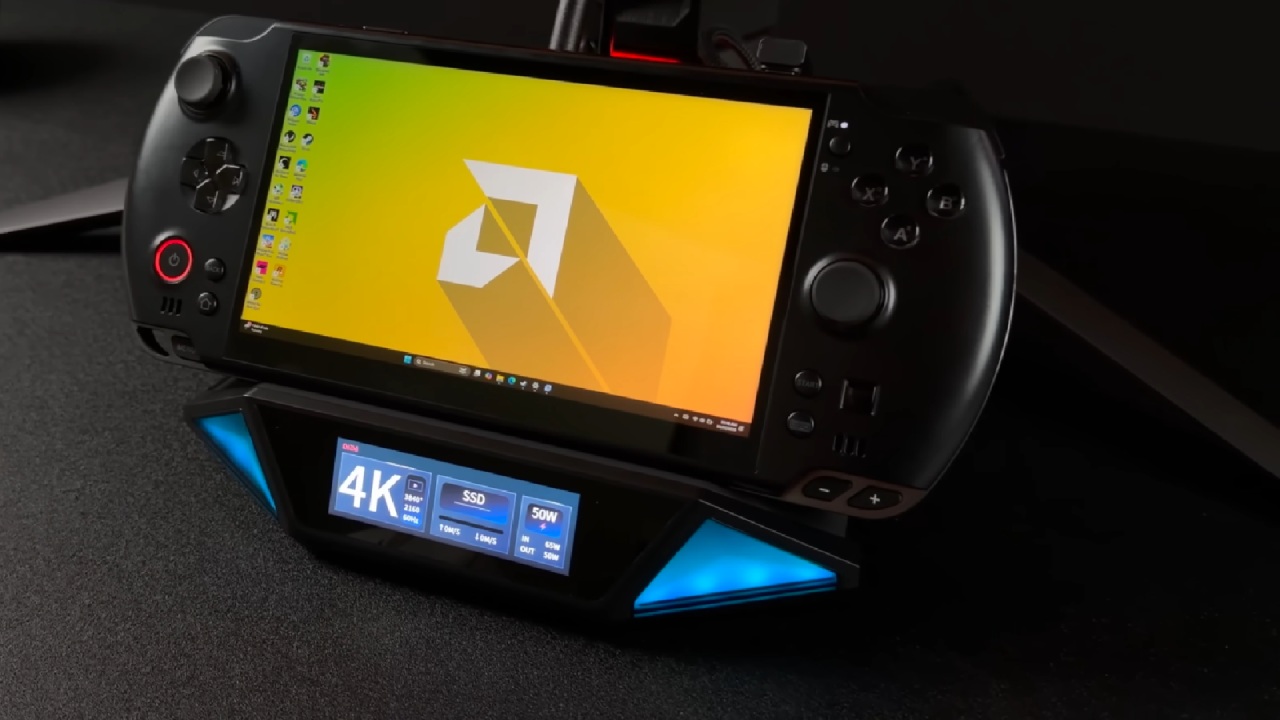
GPD Win 5 isn't just another handheld gaming device; it's a small powerhouse that can give you desktop-level performance when you use it in dock mode. The GPD Win 5 has AMD's Ryzen Max 385 CPU and a strong cooling system. It can play games at 1440p and above 60 frames per second, making it a powerful gaming PC.
It has an 80Wh battery and good power management, so it can be used for both handheld gaming and docked gaming.

Taking the GPD Win 5 to the Max
When set up correctly in dock mode, the GPD Win 5 demonstrates impressive performance that rivals traditional gaming PCs. The model equipped with the Ryzen Max 385, featuring 8 cores and 16 threads, and paired with 32GB of RAM, allows allocation of 16GB to the iGPU through BIOS or AMD software settings.
This configuration gives the Radeon 8050S integrated GPU a significant boost in performance, especially when docked and powered directly from an outlet.
The GPD Win 5 allows adjustment of power limits, with the AC TDP reaching up to 65W. On battery, the default TDP remains at 45W, but users can easily modify it depending on workload requirements.
The GPD Motion Assistant software makes it easy to adjust these power profiles, with custom modes for 20W, 45W, and 60W. Running stress tests with CPU-Z shows that the system can handle a 65W TDP, which lets both the CPU and GPU run at higher clock speeds.
Benchmark Performance gains
We did a few benchmarks to show how the performance of the 45W and 65W systems differs. Geekbench 6 reported a single-core score of 2,720 and a multi-core score of 12,834 at 45W. Increasing to 65W brought noticeable improvements, particularly in multi-core performance which was 14,066 and single-core score of 2814, as all eight cores benefited from higher wattage.
In OpenCL testing, the Radeon 8050S achieved 60,734 at 45W, which jumped to over 80,000 at 65W—a significant improvement in iGPU performance. 3DMark Steel Nomad scored 1,553 at 45W with 15.54fps, while at 65W, the score rose to 1,883 with 18.84fps. The total score in 3DMark Time Spy went from 7,985 at 45W to well over 10,000 at 65W. Both the CPU and GPU performance got better.
Real-World Gaming Results
Gaming is the best way to see how well the GPD Win 5 works. We got great results on a lot of AAA games when we used dock mode.
Spider-Man 2 at 1440p high settings with FSR balanced ran at an average of 83fps. Even at 45W and 1080p, gameplay remained smooth and fully playable.
Forza Horizon 5 at 1440p ultra without FSR averaged around 116fps. It’s even capable of running at 4K ultra settings with about 72fps.
Doom: The Dark Ages at 1440p medium settings with FSR maintained over 60fps. Allocating 16GB VRAM helped keep the game smooth, with usage peaking over 10GB.
Marvel Rivals at 1440p high settings with FSR quality never dipped below 60fps, even during intense battle scenes.
God of War Ragnarok at 1440p high with FSR balanced averaged in the mid-70s during combat, showcasing impressive consistency.
Cyberpunk 2077 at 1440p high with FSR balanced stayed comfortably playable, solidifying this setup as a 1440p-capable iGPU configuration.
For users preferring 1080p, every tested title could be run at ultra settings except Doom: The Dark Ages, which remained stable at high settings.
Cooling and Thermal Management
One of the standout features of the GPD Win 5 is its exceptional cooling system. With a twin turbo-fan setup, four thick pure copper heat pipes, and well-optimized airflow, the system maintains impressive thermal control even under heavy loads.
At 45W in handheld mode, fan noise remains minimal despite the powerful hardware inside. When operating at 65W in dock mode, average temperatures stayed around 73°C, with a peak of only 81°C during benchmarks—never reaching thermal throttling. Even with the higher TDP settings, the fan curves balance performance and noise efficiently.
Advanced users can also adjust these fan curves directly in BIOS to prioritize either quieter operation or maximum cooling.

Dock Mode as a Full-Fledged PC
What makes the GPD Win 5 stand out is how useful it is. When you hold it in your hand, it's a terrific gaming system for on-the-go use because it works well at lower wattages. But when you dock it, it becomes a real desktop replacement.
Connecting peripherals and external displays unlocks the ability to game at 1440p or even 4K, turning this handheld into a full-fledged gaming PC.
For those investing in a premium handheld, dock mode offers the best of both worlds—portability and power. Whether used for gaming, productivity, or everyday computing, the GPD Win 5 handles it all with ease. With proper setup, we can achieve desktop-class performance in a device that fits in our hands.

Final Thoughts
GPD Win 5 shows how far mobile gaming PCs have come. The Ryzen Max 385 can operate up to 65W, which lets us play AAA games at 1440p with smooth thermal performance and good cooling, all in a portable size factor.
Setting up the GPD Win 5 in dock mode lets it reach its full potential for people who desire both mobility and desktop-level capabilities.
This device's features could be even better in the future with updates like SteamOS or Bazite compatibility. But even as it stands, the GPD Win 5 delivers a gaming experience that rivals many dedicated PCs, making it a versatile and powerful option for gamers seeking performance without compromise.
Also, check our other Handheld articles :
- ASUS ROG Ally X Handheld Review: Double the Battery, Double the Comfort
- Nintendo Switch 2 Vs. Original Switch 1: A Full Comparison
- How To Connect A Camera And Join Voice Chat With Nintendo Switch 2
- Nintendo Switch 2 Review: Handheld Performance, Features & Value Breakdown
- ROG Xbox Ally X Vs. ROG Ally X: Display, Battery & Controls
- ASUS ROG Ally X vs. Steam Deck OLED: Display, Battery & Gaming Benchmarks
- MSI Claw 8 AI+ Review: Display, Controls & Gaming
- Nintendo Switch 2 vs. Steam Deck OLED: Gaming, Performance, Battery, Display and Value
- PlayStation Portal Review: Remote Play, Cloud Streaming & Travel Gaming
- PlayStation Portal vs. Lenovo Legion Go: Best Portable Gameplay
- Cyberpunk 2077 Patch 2.3 FPS Test on MSI Claw 8 AI+
Senior Editor, NoobFeed
Gaming Hardware Updates
No Data.