
Steam Controller Review Reveals Valve’s Bigger Living Room Gaming Vision
Steam Controller design shifts focus toward living room gaming while preserving familiar Steam ecosystem functionality.
Hardware by Shinji Okazaki on May 27, 2026
The new Steam Controller launch rapidly turned into a fight with the checkout page. It took almost an hour to buy something, and it was one of the hardest things on Steam. Demand brought the platform to the brink of anarchy as controllers entered carts, checkout buttons were pressed, and numerous retries became part of the process.
There were conversations in the community, there were resale ads, and it was tenacity that made the difference between success and failure. What started as a new controller launch has quickly become a larger question about where Valve sees PC gaming going and the Steam Controller’s role in that future.
A Controller That Seemed Unnecessary at First
It wasn’t an instant thrill getting our hands on the Steam Controller. This seems more like a fun add-on than a must-have. It didn’t feel like a must-have right away at $100, especially because most gaming needs were already handled by current controllers. We also have an Xbox Series X controller and an 8BitDo controller, and being someone who doesn’t use Steam Deck trackpads that often, the controller seemed very pointless at first. Helpful, perhaps, but not essential.
But after using it for a while, the outlook altered. We started to understand that maybe we’d been looking at the Steam Controller all wrong. It began to seem like a piece of something bigger that Valve has been working on, not just another controller.
Technically, this is Valve's second stab at a Steam Controller. The original Steam Controller was released in 2015 and was one of Valve’s most adventurous concepts at the time. It was optimized for trackpad input, and intended to address an issue many PC players faced: how to make mouse-heavy PC games playable from a sofa.
It was not because unusual controllers were strange. Odd controller layouts have been done before; uncomfortable hardware designs are nothing new. Unusual input devices are not necessarily a problem. The difference is that the new Steam Controller feels like Valve took the same base and molded it into something a little more digestible.
Familiar Hardware, But a Different Direction
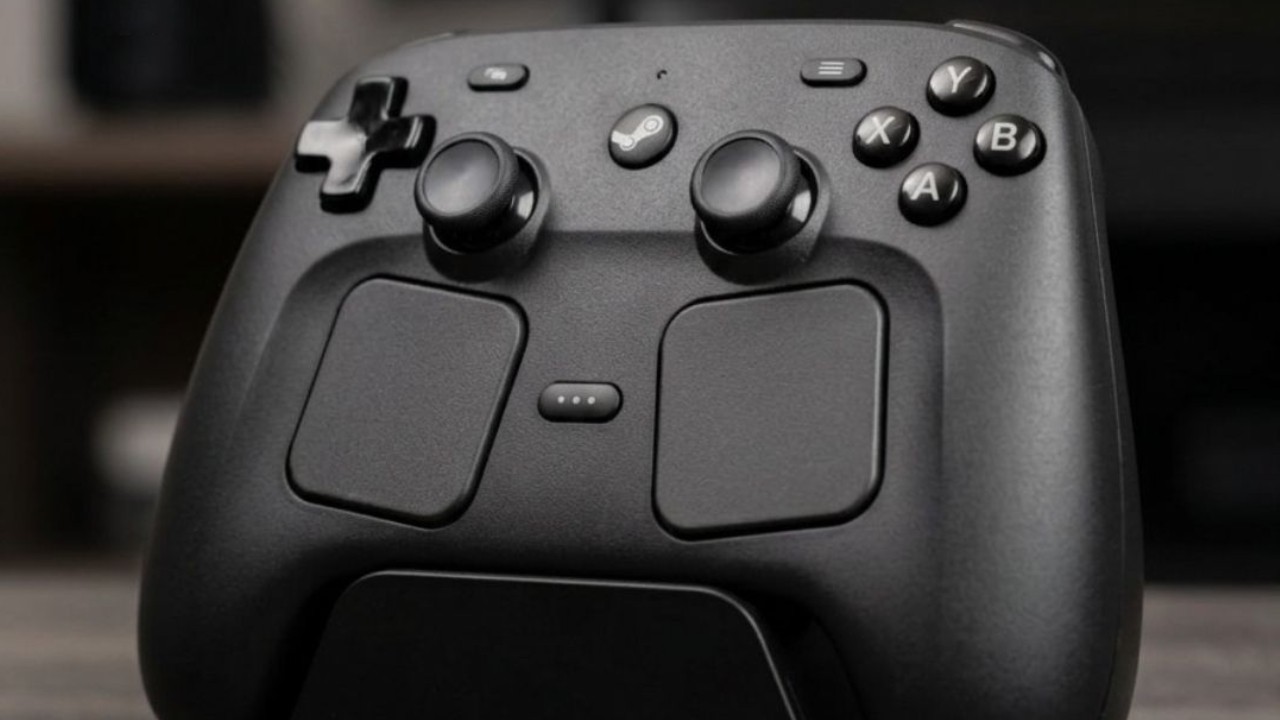
The controller is basically what you get if Valve ripped the screen out of a Steam Deck, folded the two halves together, and made it a dedicated controller. It seems smaller than it does in person. It’s just a tad bigger than an Xbox Series X controller, and it’s got a plastic casing with a smooth-but-coarse touch that feels good in the hand. It’s a little heavier at roughly 292g, but still quite close to other current controllers.
The face buttons, shoulder buttons, triggers, and D-pad will be instantly recognizable to anyone who’s ever used a Steam Deck. Nothing radically different goes on here. The buttons are snappy, and the triggers and shoulder buttons do a good job of not calling attention to themselves.
You also get the four familiar Steam Deck buttons: Steam, Quick Access, Menu, and View. If you have a Steam Deck, it will feel familiar immediately; the layout is slightly different. Initially, you will automatically seek the fast access button.
The Trackpads Still a Part of the Identity
Valve stuck the trackpads, but moved them down in the layout, bringing the standard controller inputs more to the center while keeping the original notion. We have mixed feelings about them. ” You can see easily why they exist. They remain a big part of Valve's answer to couch-based PC gaming. They’re handy if you’re playing point-and-click games, strategy games, desktop mode, older PC games, or anything that relies on cursor movement.
But that’s not the selling point for us for the controller. Even then, their removal would have compromised the Steam Controller's recognizability. The back buttons give another narrative. Some have complained about their positioning, but for us, they fall into place perfectly. Middle and ring fingers fall naturally on them without any stretching or forced unnatural hand positions.
.jpg)
TMR Magnetic Thumbsticks and Haptics
Steam Controller features TMR magnetic thumbsticks, an improvement over Hall-effect technology. TMR = tunnel magnetoresistance, meaning that magnets are employed to detect movement rather than actual contact points, which wear out over time. The promise is less power consumption, greater responsiveness, and improved long-term durability. Whether the changes are visible in day-to-day use or not, the trend is clear.
The haptic vibration is worth mentioning as well. The rumble is solid and familiar, more Xbox Series X controller than any other type of detailed input. It does so without becoming distracting. On the surface, the puck seems like a magnetic charging port, and that’s undoubtedly one of its purposes. Once we finish playing, the controller immediately starts charging the puck.
But the puck also acts as a 2.4GHz wireless receiver, which should provide a more consistent connection than Bluetooth and reduce latency. There is a sense of purpose to it. Valve could have made a little USB dongle to hide behind a PC, but instead has made something meant to sit out in the open, on a desk, entertainment center, or table. The controller has a place to relax, stay charged, and be seen.
Steam Integration Changes The Game
Where the Steam Controller wins out over a standard controller is in its integration with Steam. Other controllers can play nice with Steam, and in many games, they play nice enough. But the Steam Controller feels more baked into the platform. It feels more like it's tied into how Steam works, rather than just working with Steam.
It may connect in three ways: USB-C, Bluetooth, or the supplied wireless puck. The puck of the three is, to me, the cleanest experience. The puck can be moved between devices once linked. You can plug it into another computer or a dock, power up the controller, and Steam recognizes it without going through another setup process.
Where it feels less refined is in the button combinations needed to change modes. Press and hold the B (right bumper) and Steam buttons to put it into Bluetooth mode. To change back to the puck, hold A, the right bumper, and the Steam button. Once you learn it, the system works, but it feels more complicated than it has to be. And having a separate sync button would’ve really made things easier.
Extend Controller with Steam Input Customization
Gyro assistance is also back, and if you’ve ever used it on Steam Deck, it feels instantly familiar. That exact aiming sense you get with motion controls was back right away when I started gaming with it. Small movements start to feel functional rather than annoying.
Grip Sense has a very different idea. The controller can sense how you’re gripping it, so you can adjust your grip to activate inputs or gameplay activities. Theoretically, that sounds smart. We briefly tried it in a racing game, where removing a hand would pause the game. The idea was good, but the application seemed a little bit hit-or-miss.
.jpg)
The small hand movements and subtle grip variations led to inadvertent pauses, making it more difficult to rely on the feature during active play. It’s more like an experiment at the moment than anything essential, but maybe the Steam community may find better ways to use it.
The main downside of the Steam Controller is its limited compatibility. Clearly, the controller is made for Steam, and if that’s where you do most of your gaming, this constraint might not be a big deal. For us, desktop gaming is mostly inside Steam; thus, the controller feels natural to use. However, the restrictions become apparent when gaming is done outside that context.
But, even inside supported conditions, not all compatible titles play nicely with the controller. More importantly, other game platforms beyond Steam generate friction. If you spend time on Xbox Game Pass on PC, the Epic Games Store, Ubisoft Connect, and/or other launchers other than Steam, the experience is far less consistent.
The Controller Begins To Feel Like Part Of Something Larger
As we played around with the Steam Controller on various devices, an intriguing concept began to emerge. The controller seems ready for living room gaming, and in many ways, Steam already feels ready. But in fact, the Steam Deck, gaming laptops, and small PCs can make living-room gaming a reality.
There are docking systems, wireless systems, and several combinations that are already supported by controllers. But the procedure still doesn't feel quite finished. Enter the Steam Controller and begin highlighting that missing item.
Instead of feeling like a single gadget, it starts to feel like a part of a larger direction Valve has been silently working towards. Instead, it starts to seem like connective tissue in an ecosystem that Valve is developing. The aim is to make the transition from one method of play to another easier. You play at a desk, then you go to a portable, or you sit on a couch, and everything just follows.
Steam Controller alone doesn’t fix the living room gaming problem.
If there is a future Steam Machine, the controller suddenly seems less like an experiment and more like a sign of preparedness. No, everyone doesn’t need to run right out and get one. Nor does it justify higher resale prices. But once you start using it, the Steam Controller is hard to overlook, given that Steam already defines much of how you play.
It became the controller we most wanted to use with Steam. More importantly, it makes it easy to follow Valve’s lead. It seems the company wants to bring the usual convenience of console gaming while offering the flexibility and openness of PC gaming. Steam Controller is not the whole story. It feels more like a signal of where that plot might go next.
Editor, NoobFeed
Gaming Hardware Updates
No Data.