
ASUS ROG Strix X870E-Gaming Motherboard Full Review and Features Breakdown
A detailed breakdown of the ROG Strix X870E motherboard, highlighting connectivity, storage options, power delivery, and platform compatibility.
Hardware by Nahe Yan on Nov 26, 2025
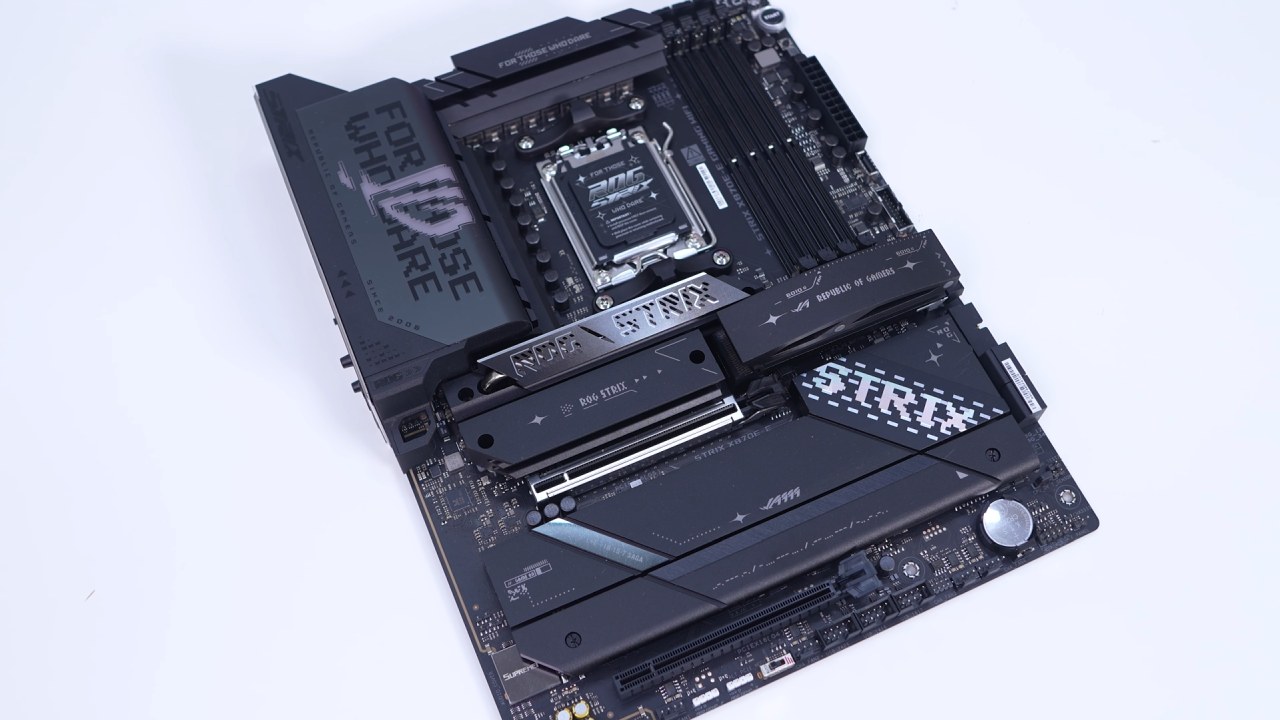
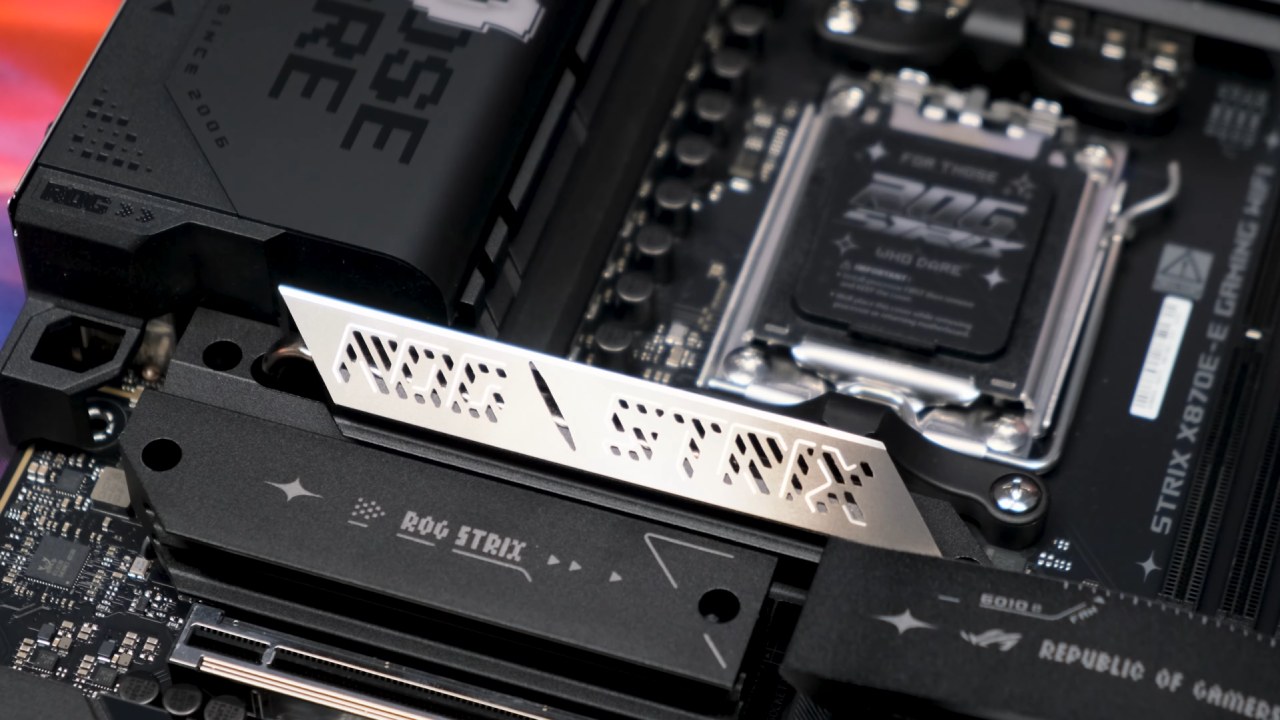
The ROG Strix X870E-Gaming Wi-Fi is a standard ATX motherboard designed with a black PCB and silver and gunmetal accents on the heat sinks and various covers. It features AMD’s AM5 socket, supporting Ryzen 9000, 8000, and 7000 series processors. Around the CPU socket is an 18+2+2 power phase design with 110A CPU power stages.
Two large heat sinks connected by a heat pipe cover the power delivery components. The top corner includes a rear I/O cover displaying “For Those Who Dare” along with the ROG logo. Dual 8-pin metal-reinforced EPS connectors sit on the top edge.
Cooling, Fan Headers, and Memory Support
Across the top edge are four 4-pin headers, each covered to prevent pin damage. These include the CPU fan header, optional CPU fan header, AIO pump header, and chassis fan header. The board provides four DDR5 DIMM slots supporting up to 256GB of DDR5-8400 memory and features Nitroad DRAM slots. The redesigned slot structure allows improved headroom across multiple configurations.
Edge-Mounted Controls and Connectivity
On the far edge, there is a postcode display, a 3-pin ARGB header, a large power button, a smaller FlexKey button, the 24-pin ATX connector, a USB 3.2 Gen2x2 header, and two USB 3.2 Gen1 headers, one with metal reinforcement. Four SATA6Gb ports are angled at 90° to avoid interference with expansion cards.
Along the bottom edge, the board includes front-panel audio, a 4-pin fan header, two 3-pin ARGB headers, a PCIe mode switch, another 4-pin fan header, three USB 2.0 headers, two additional 4-pin fan headers, front-panel connectors, and a temperature sensor header. The inclusion of three internal USB 2.0 headers is notable for a modern board.
M.2 and Storage Configuration
Four removable heat sinks cover the lower section of the case for five M.2 slots. The top three heat sinks are thicker for PCIe5.0 SSDs. The topmost heat sink uses a button for toolless removal, while the next two share a large dual-section heat sink secured with screws. The bottom heat sink covers the remaining PCIe 4.0 slots.
The top three M.2 slots support PCIe 5.0, while the bottom two support PCIe 4.0. The PCIe5.0 slots include bottom heat sinks. The top slot supports up to 110mm drives, and the remaining accommodate 80mm drives. All M.2 slots support toolless installation, using either the M.2 Q-Slide on the top slot or the M.2 Q-Latch mechanism on the others.
Expansion Slots and GPU Release Mechanism
Expansion includes one PCIe 5.0 x16 slot and one PCIe 4.0 x16 (x4 electrical) slot. The top slot is metal-reinforced. ASUS includes a simplified GPU removal feature that lets the card release by lifting it at an angle, rather than relying on a button, making GPU extraction straightforward.
Rear I/O Layout
The integrated rear I/O shield includes HDMI, two USB4 Type-C ports, ten USB 3.2 Gen2 ports (nine Type-A and one Type-C), a clear CMOS button, BIOS FlashBack button, USB 3.2 Gen2x2 Type-C port with 30W PD support, 5Gb Ethernet, Wi-Fi 7 antenna connectors, and audio outputs.
RGB lighting is minimal, limited to the rear I/O ROG logo. Internally, the board offers only three ARGB headers, with no legacy RGB headers available.
Final Thoughts
The feature set makes the X870E-Gaming Wi-Fi suitable for systems with multiple connected devices and heavy M.2 storage usage. The board offers 13 rear USB ports, including USB4 and high-speed USB3.2 Gen2 options. Internally, there are additional USB ports: a Gen2x2 header, two USB3.2 Gen1 headers, and three USB2.0 headers.
The board supports up to five M.2 drives across three PCIe 5.0 and two PCIe 4.0 slots. Heat sinks cover all PCIe5.0 slots, and the toolless design simplifies installation. For high-power CPUs such as Ryzen 9, the 18+2+2 VRM layout with 110A stages and heat-pipe-linked heat sinks supports stable operation.
Fan header availability and ARGB header options give flexibility. However, a standard RGB header could benefit users with older lighting devices. Beyond software preferences, such as opinions about Armory Crate, the board maintains a strong overall feature set. Wi-Fi 7 and 5Gb LAN add to its modern connectivity profile.
We recommend this motherboard for high-end Ryzen builds requiring extensive connectivity and storage support.
Check Our Other AMD articles below:
- AMD Ryzen 9 9950X3D Review: Setting The Standard For 2025 Gaming CPU
- AMD Ryzen 7 9800X3D Review: 3D V-Cache Goes God Mode with Stunning Gaming Performance
- AMD RX 9070 Performance Review: Thermals, Clocks, and Real-World FPS
- AMD Ryzen 5 7600 Review: Best Budget Gaming CPU of 2025?
- AMD Radeon RX 7800 XT Review: RDNA 3 Power For Midrange Gaming
- Sapphire NITRO+ AMD Radeon RX 9070 XT Review: The Ultimate 4K Gaming GPU
- AMD Ryzen 7 7800X3D: Delivers Gaming Performance Far Beyond Expectations
- AMD Ryzen 9 7900X Review: Powering the AM5 Era with DDR5 & PCIe 5.0
- ASRock Radeon RX 7800 XT Challenger OC Review: Best Price-to-Performance GPU of 2025
- Intel Core i9‑14900K vs. AMD Ryzen 7 7800X3D: Power Profiles & Gaming Benchmarks
Editor, NoobFeed
Gaming Hardware Updates
No Data.