
Linux on ROG Xbox Ally: Performance, Setup, and Gaming Experience
Linux runs smoothly on the ROG Xbox Ally, offering stable performance, full system controls, and optimized gaming experience.
Hardware by Tanvir Kabbo on Oct 27, 2025
Linux has officially arrived on the all-new ROG Xbox Ally, bringing new flexibility and control to the handheld gaming space. With the Ryzen Z2A APU inside, it offers solid performance and a smooth Linux experience that closely mirrors what we've seen on the Steam Deck.
While the Steam Deck OLED display still leads in quality, the Ally's 1080p screen and extra system buttons add unique advantages.
.jpg)
Hardware Overview
The ROG Xbox Ally is powered by the AMD Ryzen Z2A, a Zen 2-based CPU featuring 4 cores and 8 threads. The integrated GPU uses 8 RDNA 2 compute units and, compared to the Steam Deck, runs slightly faster, with CPU clocks up to 3.8GHz and GPU clocks up to 1800MHz.
This gives it a modest performance edge over Valve's handheld, which maxes out at 3.5GHz and 1600MHz, respectively. The Ally's 7-inch 1080p display, 16GB of shared LPDDR5 memory (8GB system, 8GB GPU), and responsive controls create a comfortable gaming experience.
Installing and Running Linux
We got Linux running on the device using Bazzite OS, an optimized Linux distribution designed for handheld gaming. Attempts to install official SteamOS were unsuccessful, as it currently doesn't boot on the Ryzen Z2A. However, with Bazzite, performance and usability have been excellent.
The system interface runs smoothly at 1080p120hz, and all key features, such as Wi-Fi, Bluetooth, and TDP control, work properly. The front buttons, including the quick access and Armoury Crate keys, integrate seamlessly with Linux, allowing access to quick menus and system settings just like in Windows.
Performance and System Settings
The system says that the AMD Ryzen Z2A is running at speeds of up to 3.8GHz and has full access to 16GB of RAM after Bazzite is installed. The "Handheld Daemon" tool that comes with Bazzite lets us change a lot of things, like TDP modes (6W, 15W, 20W, or custom up to 24W), fan curves, charge restrictions, and GPU frequencies. The GPU can be manually tuned up to its 1800MHz limit, and CPU power modes can be toggled between low, balanced, and high performance.
RGB lighting isn't yet supported in Linux on the Ally, but nearly everything else functions perfectly. Updates, controller configurations, and system tweaks are all accessible within the Bazzite interface.
Gaming Performance
We put several popular games to the test to compare performance with the Steam Deck.
Cyberpunk 2077 was first. Using the Steam Deck preset at 720p, it averaged a locked 30fps at a 20W TDP—roughly equal to the Deck's experience at 15W. Unlocking the framerate yielded around 42–43 fps, while the benchmark results showed a small lead for the Ally (51.96 fps vs. 47.73 fps on the Steam Deck).
When bumped to 900p resolution, Cyberpunk remained playable at 33–37fps. At 1080p, we had to re-enable the 30fps lock for consistent performance.
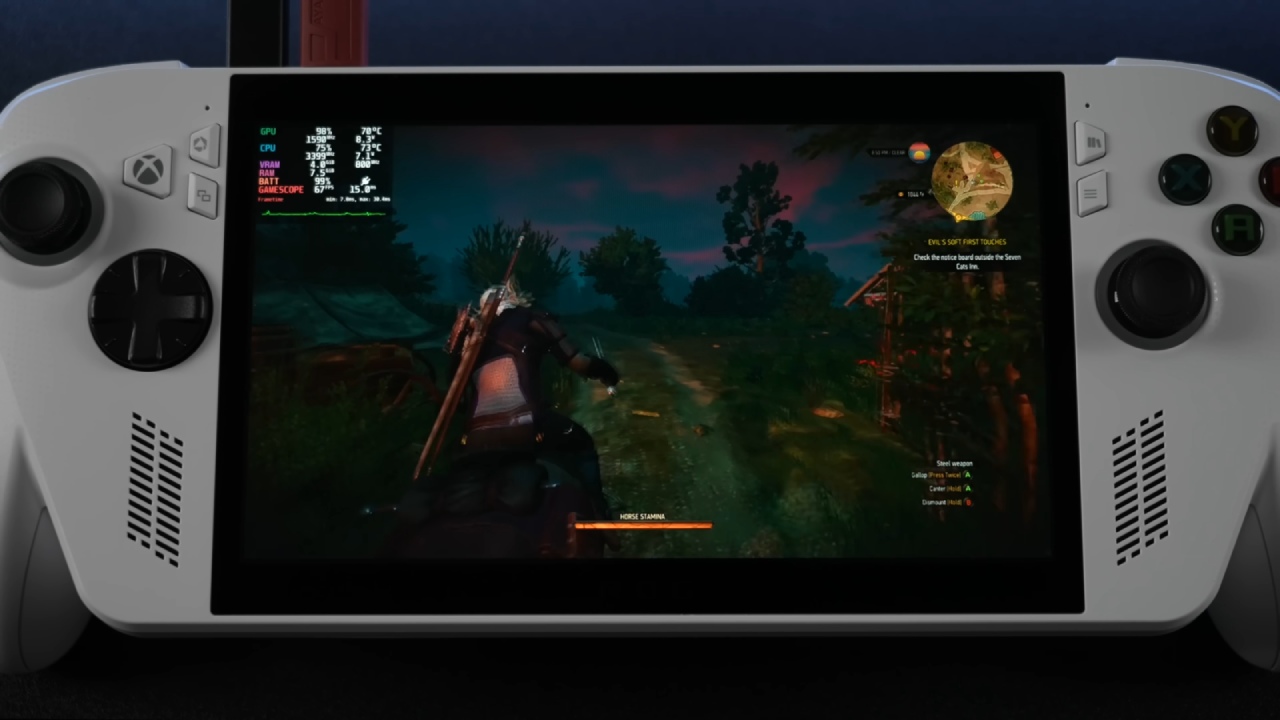
The Witcher 3 at 900p with the Steam Deck preset averaged above 60 fps, demonstrating solid optimization.
.jpg)
Elden Ring, set to low at 720p, hovered near 60fps—impressive for such a demanding title.
Mortal Kombat 1 at 720p low with FSR balanced nearly hit 60 fps, only dipping slightly below.
Doom: The Dark Ages, running its new handheld preset with FSR balanced, maintained a fluid experience thanks to the Ally's variable refresh rate display.
Battery Life and Power Draw
Battery performance under Linux was surprisingly efficient. The system only used 7.7W at a 6W TDP, which meant that with the 60Wh battery, it could run for up to 9 hours while playing light 2D or indie games. When the power demand went up to 15W, it went up to about 23W, which was enough for about 2 hours and 30 minutes of gameplay for AAA games. The battery life reduced to roughly 2 hours when the TDP stayed at 20W.
These results are in line with expectations for a handheld of this power level, offering flexibility between performance and longevity depending on the workload.
.jpg)
Final Thoughts
Linux runs exceptionally well on the ROG Xbox Ally, offering near-Steam Deck performance with a few extra MHz of headroom. While the Steam Deck OLED's screen quality still stands out, the Ally's sharper 1080p display and customizable system controls make it a strong Linux gaming alternative.
We're continuing to monitor progress on official SteamOS support, which could unlock even better optimization for the Z2A chipset. For now, Bazzite provides a stable and feature-rich Linux experience on the Ally—proof that handheld PC gaming continues to evolve beyond Windows.
Also, check our other Handheld articles below :
- ASUS ROG Ally X Handheld Review: Double the Battery, Double the Comfort
- Nintendo Switch 2 Vs. Original Switch 1: A Full Comparison
- How To Connect A Camera And Join Voice Chat With Nintendo Switch 2
- Nintendo Switch 2 Review: Handheld Performance, Features & Value Breakdown
- ROG Xbox Ally X Vs. ROG Ally X: Display, Battery & Controls
- ASUS ROG Ally X vs. Steam Deck OLED: Display, Battery & Gaming Benchmarks
- MSI Claw 8 AI+ Review: Display, Controls & Gaming
- Nintendo Switch 2 vs. Steam Deck OLED: Gaming, Performance, Battery, Display and Value
- PlayStation Portal Review: Remote Play, Cloud Streaming & Travel Gaming
- PlayStation Portal vs. Lenovo Legion Go: Best Portable Gameplay
- Cyberpunk 2077 Patch 2.3 FPS Test on MSI Claw 8 AI+
Senior Editor, NoobFeed
Gaming Hardware Updates
No Data.