
Lenovo Legion Pro 5 Gen 10 Review: RTX 5060 Performance Tested
Lenovo combines a refined chassis design with strong thermal management and a comfortable RGB keyboard for extended gaming sessions.
Hardware by Masaru Hoshino on Dec 13, 2025
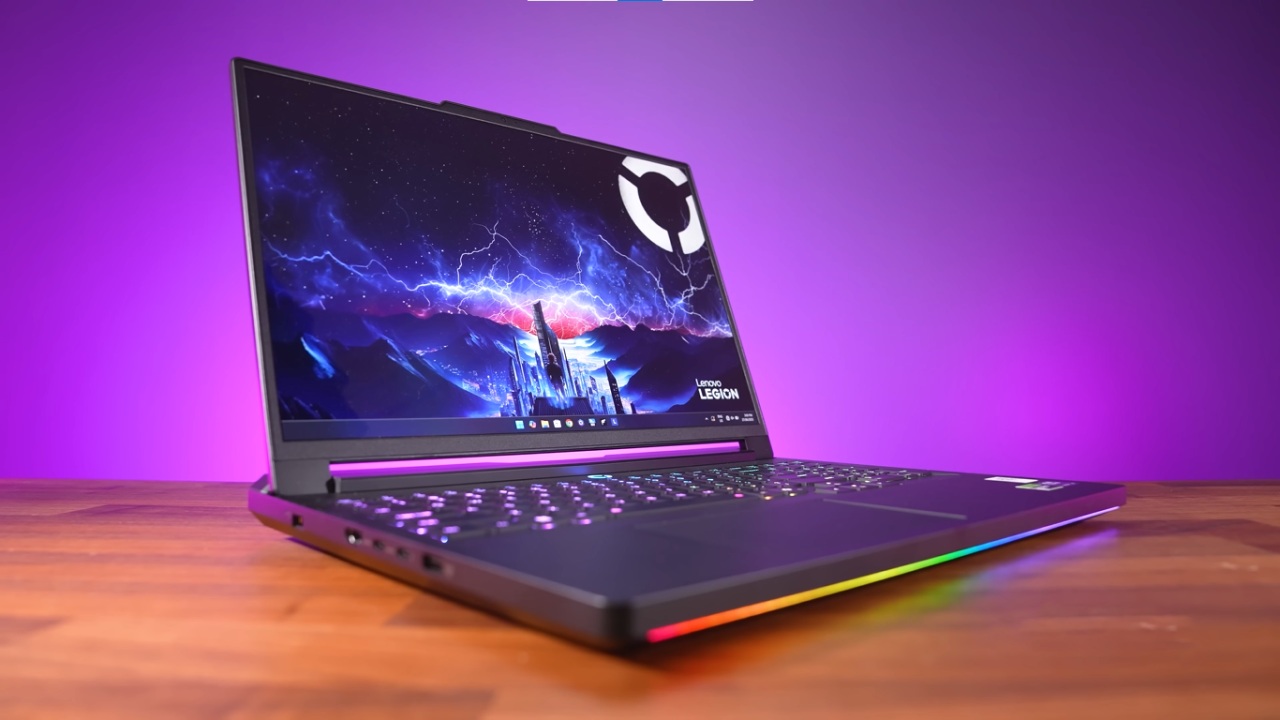
Lenovo Legion Pro 5 Gen 10 is a brand-new gaming laptop that attracts a lot of attention for its performance-focused design. The display is the most obvious thing that stands out after a few days of trial.
The system has a 16-inch 165Hz OLED panel that supports HDR1000, delivering deep blacks, rich contrast, and bright colors. The screen itself looks great and is certainly better than regular IPS displays, even if the entire effect doesn't always come across correctly in recorded footage.
Design, keyboard, and trackpad
The Legion Pro 5 Gen 10 has a full keyboard with a number pad, a trackpad that is about the right size, and a typing experience that feels robust and snappy. The keyboard has 1.6mm of travel and 24-zone RGB backlighting that you can fully configure with Lenovo Legion Space.
There is a Legion LED ring around the power button that changes color depending on the performance setting you choose.
The chassis design incorporates a posterior protrusion, often called a "chin." This has not caused any problems with the device's everyday use. There is no rear I/O on this Legion model, unlike earlier models. Instead, all of the ports are on the left and right sides of the laptop.
Ports and Connectivity
The right side of the laptop has a gigabit Ethernet connector, an e-shutter button to turn off the webcam, two always-on full-size USB ports that can transfer data at 5Gbps, and a 3.5mm audio input.
On the left side are the power input, an HDMI port, two USB-C 10Gbps ports with DisplayPort 2.1 capability (one of which can deliver up to 100W of power), and an extra full-size USB 10Gbps port. A 245W adaptor provides power, giving you enough headroom for high-performance workloads.
.jpg)
Hardware Configuration and Specifications
Lenovo offers a choice of CPU and GPU configurations for the Legion Pro 5 Gen 10. AMD Ryzen 7 8745HX CPU in the tested configuration has 8 cores and 16 threads, a base clock speed of 3.6GHz, and peak rates of up to 5.1GHz. The choice of an 8000-series CPU in a 2025 system may seem a little strange, especially when you think about how well it should work with multiple cores.
It has 32GB of DDR5 dual-channel memory running at 5200 MT/s and an Nvidia GeForce RTX 5060 laptop GPU with 8GB of GDDR7 VRAM. When Dynamic Boost is turned on, the GPU can use up to 115W TGP. The 16-inch OLED screen features a resolution of 2560x1600, a 165Hz refresh rate, HDR compatibility, and 100% DCI-P3 color gamut. Wi-Fi 7, Bluetooth 5.4, an 80Wh battery with Super Rapid Charge, and Windows 11 already installed are among the other features.
Everyday Use and Performance Profiles
The trackpad works well and seems responsive after a few days of use, though it feels like there is room for a larger surface. The keyboard is still comfortable for both gaming and work. Legion Space lets you control performance modes with Quiet, Balanced, Performance, and Custom profiles. The LED around the power button changes colors to indicate which mode is currently active.
When you unplug the system, it defaults to quieter settings. When you plug it into the wall, it unlocks higher-performance modes. Legion Space lets you customize a lot, including manually setting power limits for the CPU and GPU, adjusting fan curves, and configuring Dynamic Boost.
Custom profiles can keep the CPU running at 85W for a long time and give it short bursts of up to 130W. However, even with around 65W of limitations, it still performs well at lower temperatures.
Gaming Performance
The first gaming test suggests that RTX 5060 works well. Spider-Man 2 runs well at high settings at 1600p, with average frame rates exceeding 70 fps. It doesn't rely too much on DLSS or frame generation. In performance mode, the CPU and GPU power are balanced, and there's little noise.
With an ultra-high mix and DLSS set to quality, Red Dead Redemption 2 runs at about 71 frames per second (fps) at 1440p resolution. It sometimes drops into the mid-60s when there are many particle effects. Under these conditions, the GPU uses about 90W, and the CPU uses between 60W and 65W.
Forza Horizon 5 runs quite well at 1440p Ultra without DLSS, averaging about 138 fps. But in increasingly demanding games, the limits of VRAM become clear. For instance, Borderlands 4 struggles to maintain 60 fps at 1440p on medium settings with DLSS balanced.
But when you enable DLSS 4 multi-frame generation at X4, the game runs faster than 160 fps, demonstrating how useful Nvidia's newest upscaling algorithms are.
Benchmarks and Synthetic Results
Synthetic benchmarks make it even clearer what the system can and can't do. In single-core performance, Geekbench 6 scores reach 2754, while in multi-core testing, they reach 13836. This shows that the processor is quite good at single-threaded tasks but not as good at multicore tasks as newer processors.
The system gets 2890 in 3DMark Steel Nomad, with an average frame rate of 28.10 frames per second. The Time Spy findings are quite good, with a score of 12699, which is better than what was expected for an RTX 5060 laptop GPU.
.jpg)
Thermals and Cooling
Using the default fan curve in Performance mode keeps thermal performance under control. When playing games at 1440p, the RTX 5060's average temperature is 64°C, with a high of 69°C. The CPU gets hotter, with an average temperature of 80°C and a peak temperature of 94°C when the load is increased.
You can regulate thermals by lowering CPU power limits or adjusting the fan curve. Still, higher fan speeds will naturally produce more noise. Temperatures stay within acceptable norms for a high-performance laptop, as predicted.
Final Thoughts
Lenovo Legion Pro 5 Gen 10 offers a good balance of performance, heat, and picture quality. The OLED screen is a big plus; it's a big step forward from regular IPS displays. RTX 5060 is a good choice for its class, but if you want more power, you can choose higher-end models with RTX 5070 GPUs and faster CPUs.
The system has good gaming performance, flexible power management, and a great screen for its configuration. This makes it a great choice in Lenovo's current lineup.
Also, check our other hardware articles:
- AMD Ryzen 9 9950X3D Review: Setting The Standard For 2025 Gaming CPU
- Amazon Luna 2025 Review: Is Prime Gaming's Cloud Service Your Go-To For Casual Fun?
- AMD RX 9070 XT Review: AMD's RDNA 4 Champion for 1440p Gaming
- GeForce Now Ultimate: Ditching Your Gaming PC For Cloud RTX 4080 Power?
- NVIDIA GeForce RTX 5080 Review (2025): Still A 4K Gaming Powerhouse?
- Intel Core Ultra 9 285K Review And Performance Breakdown (2025)
- AMD Ryzen 7 9800X3D Review: 3D V-Cache Goes God Mode with Stunning Gaming Performance
- Intel Core Ultra 9 285K vs AMD Ryzen 7 9800X3D: In-Depth Gaming Performance and Benchmark Comparison
- NVIDIA GeForce RTX 5080 Super Performance In Cyberpunk 2077: Path Tracing & DLSS 4.0 Tested
- AMD Radeon RX 9070 XT In Cyberpunk 2077: Ray Tracing & FSR 4.0 Tested
- Intel Arc B580 Review: The $250 GPU Revolutionizing 1440p Gaming
- Intel Arc B570 Vs. B580: Value, Specs, And Real-World Gaming Performance
- RTX 5090 Laptop Vs. M4 Max MacBook Pro: Ultimate Raw Performance Vs. Battery Endurance
- Intel Arc b580 Vs. RTX 4060: Game Performance And Value Analysis
- RTX5090 Hell Is Us Demo 4K Ultra Benchmark: DLSS Vs. Native Performance Guide
- NVIDIA RTX 5070 Review: Mid-Range Muscle or Marketing Hype?
- Nintendo Switch 2 Review: Handheld Performance, Features & Value Breakdown
- RTX 5070 Ti Review: Performance, Thermals & Power Efficiency Tested
- Samsung Odyssey OLED G81SF Review 2025: Ultimate 32-Inch QD-OLED Gaming Monitor
- AMD RX 9070 Performance Review: Thermals, Clocks, and Real-World FPS
- AMD Ryzen 5 7600 Review: Best Budget Gaming CPU of 2025?
- AMD Radeon RX 7800 XT Review: RDNA 3 Power For Midrange Gaming
- Asus ROG RTX 5090 Astral OC Vs. Founders Edition: The 4K Gaming Benchmark
- Intel Core i5-13400F Gaming Performance: Still Worth It in 2025?
- ASUS GeForce RTX 5090 LC Liquid Cooled GPU Review: Unmatched Silence & Speed
- ASUS ROG Ally X Handheld Review: Double the Battery, Double the Comfort
- Lenovo Legion Go S Review: The Ultimate Steam Deck 2 Alternative
- Sapphire NITRO+ AMD Radeon RX 9070 XT Review: The Ultimate 4K Gaming GPU
- Alienware 16 Area 51 Review: The Ultimate 2025 Gaming Laptop
- Alienware Area-51 Review: Unmatched 4K, Thermal, and Acoustic Performance
- AMD Ryzen 7 7800X3D: Delivers Gaming Performance Far Beyond Expectations
- AMD Ryzen 9 7900X Review: Powering the AM5 Era with DDR5 & PCIe 5.0
- Intel Core i9‑14900K vs. AMD Ryzen 7 7800X3D: Power Profiles & Gaming Benchmarks
- Intel Core i9 14900K: Specs, Benchmarks, and Competitor Comparison
- ASRock Radeon RX 7800 XT Challenger OC Review: Best Price-to-Performance GPU of 2025
Editor, NoobFeed
Gaming Hardware Updates
No Data.