
ROG Ally & Ally X: Latest Armoury Crate SE Enhancements Explained
Armoury Crate SE introduces new performance features that improve system behavior and expand handheld customization flexibility.
Hardware by Tanisha Aria on Nov 28, 2025
Performance and usefulness have improved significantly in the ROG Ally X and earlier Ally models thanks to recent updates.
These changes improve how the system works, make it easier to optimize games, and give you more control over how CPU cores are configured. Updates from both ASUS and Xbox are making the handheld experience faster and more uniform across games that support it.
.jpg)
Armoury Crate SE 1.15 Update and New Features
We just got a big update for Armory Crate SE. It has many new features that make it easier to control performance on the Ally and Ally X. Armoury Crate SE 2.1.15.0 now works with all models, including the ROG Xbox Ally. ROG Xbox Ally X.
The new CPU core control choice on the Ally X is an exclusive feature that lets us turn on or off the Z2 Extreme processor's performance and efficiency cores.
Now that there are 3 performance cores and 5 efficiency cores, we can turn off some of them to improve battery life or boost iGPU performance, depending on our needs.
When fewer cores are active, the CPU uses less power, freeing up more power for the iGPU to enable faster gaming. We can also use custom key bindings to go into and out of full-screen mode, and we can now get update messages right in the command center.
The FPS cap has been improved by enabling AMD Radeon Chill and setting the minimum frame rate to 40 fps. These changes work well with the 120Hz VRR panel and help keep the game running smoothly. There are also improvements to the user interface and power mode that make it easy to tune performance.
Xbox Default Game Profiles and Auto-Optimized Performance
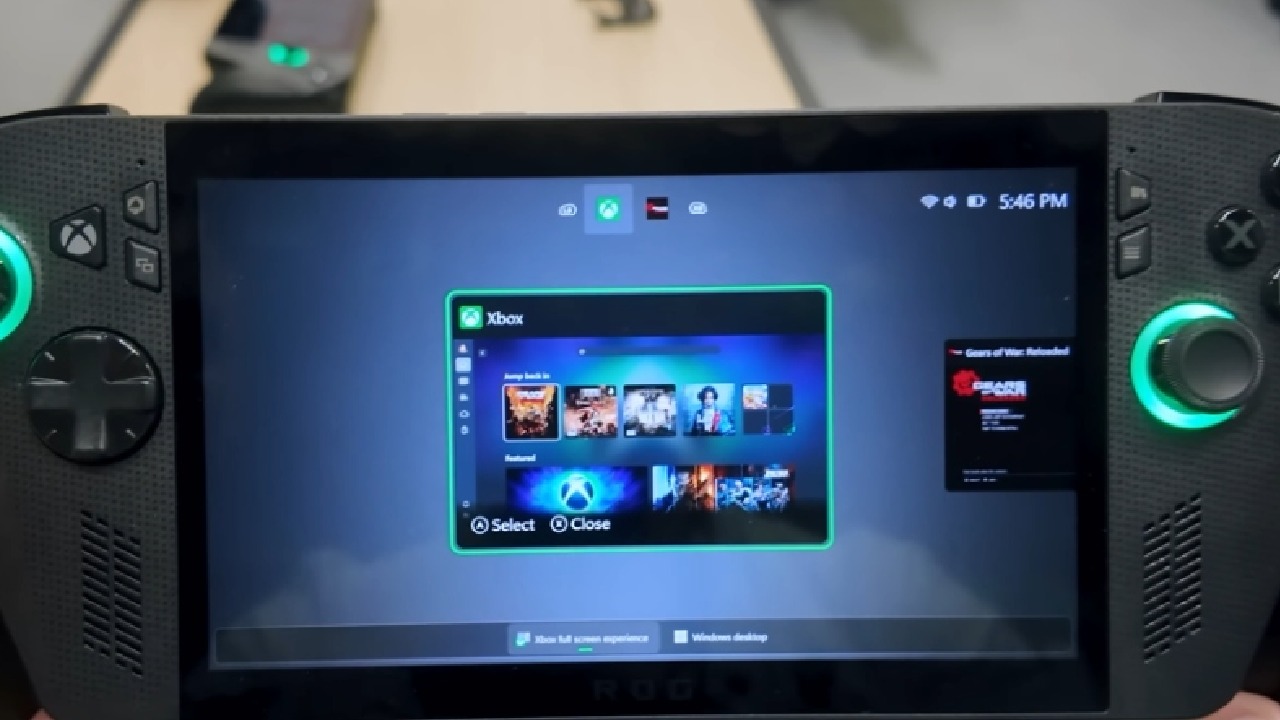
Another big feature comes straight from Xbox. You can now see default game setups in the preview, which offer the best settings for each game. About 40 games are available right now, with more added over time. With these settings, TDP is automatically adjusted to maintain a steady framerate.
To keep the game running smoothly, the profile temporarily increases power when the frame rate drops below the target FPS. When the game exceeds its target FPS, the system reduces power to save battery. This lets you start a game without changing the power settings individually.
At the moment, these profiles only work with games from the Microsoft Store or the Xbox app. They don't work with Steam games.
If the Steam version of a supported game is set up, the performance rating will only appear for the Xbox version. With the new "handheld optimized" marking in the Xbox app, we can see which games are supported.
Expanded CPU Core Controls on the Z2 Extreme
One of the coolest new features is that Armory Crate SE now lets you set up CPU cores directly. We can now decide how many efficiency cores and speed cores stay on. The Z2 Extreme comes with 8 cores and 16 threads out of the box. There are 3 full Zen5 speed cores and 5 Zen5C efficiency cores.
The chip is now set up with 6 cores and 12 threads after one speed core and one efficiency core are turned off. This reduces the CPU's power consumption, allowing the iGPU to run much faster during intense games.
When we test 8-core vs. 6-core setups with the same 18W TDP, we see iGPU clock speeds go up by up to 400MHz. This means that the frame rate will stay stable in some games.
We could also turn off all performance cores for light tasks or indie games to get longer battery life, but for AAA games, moving power to the iGPU usually makes a bigger difference.
Real-World Testing With Tony Hawk Pro Skater
We used Tony Hawk Pro Skater 3+4 to test the new basic Xbox profile. The game works fine without the speed profile, but when you try to push it to 120fps, it often crashes.
When the usual game profile is enabled, the system aims for 60 fps, which makes the experience smoother and more consistent while using much less power.
During gameplay, the TDP ranges from about 13W to 16W, depending on the scene's complexity. The setting caps the framerate at 120 fps, but the system smartly manages power and stays at 60 fps because this GPU can't handle 120 fps. This behavior stops dips and stops power from being used for no reason.
How to Identify Handheld-Optimized Games
Games that can be played on the Xbox app are marked with icons such as "handheld optimized" or "mostly compatible."
These labels are on games like Minecraft (Windows version) and Hogwarts Legacy to show that they have been tested or tuned to work well on handheld devices. These tags will help us identify which games in Armory Crate SE currently use optimization settings.
Compatibility With Steam Versions of Supported Games
We checked whether the feature works with Steam versions of games like Doom Eternal. Doom Eternal and Doom: The Dark Ages are approved on Xbox Wire, but the game profile doesn't appear for the Steam version.
Armory Crate SE doesn't show a basic profile when the Steam copy is launched. This system can only use versions purchased from the Xbox or the Microsoft Store. It would be great if future updates let you scan metadata so profiles can be used across all sites.
Final Thoughts on the Latest Updates
We're seeing steady growth for the Ally line, with ASUS and Xbox both making improvements. These changes improve the handheld experience by making power management easier, improving UI controls, and adding features that let each game run better without manual tweaks.
Since Xbox is still putting a lot of effort into supporting handhelds after the ROG Xbox Ally X came out, we can expect more game options and improvements to the system itself.
You should check out these changes if you have a ROG Ally or Ally X, especially in Big Screen Experience mode. They make the device easier to use, more stable, and better at battery life, all of which are important parts of a great handheld game experience.
Also, check our other Handheld articles :
- ASUS ROG Ally X Handheld Review: Double the Battery, Double the Comfort
- Nintendo Switch 2 Vs. Original Switch 1: A Full Comparison
- How To Connect A Camera And Join Voice Chat With Nintendo Switch 2
- Nintendo Switch 2 Review: Handheld Performance, Features & Value Breakdown
- ROG Xbox Ally X Vs. ROG Ally X: Display, Battery & Controls
- ASUS ROG Ally X vs. Steam Deck OLED: Display, Battery & Gaming Benchmarks
- MSI Claw 8 AI+ Review: Display, Controls & Gaming
- Nintendo Switch 2 vs. Steam Deck OLED: Gaming, Performance, Battery, Display and Value
- PlayStation Portal Review: Remote Play, Cloud Streaming & Travel Gaming
- PlayStation Portal vs. Lenovo Legion Go: Best Portable Gameplay
- Cyberpunk 2077 Patch 2.3 FPS Test on MSI Claw 8 AI+
Contributor, NoobFeed
Gaming Hardware Updates
No Data.