
Ghost of Yōtei Guide | How to Set Auto Lock Target
Here’s how you can enable Auto Lock Target in Ghost of Yōtei.
Game Guide by Joy Rahman on Oct 05, 2025
The auto look feature is a useful mechanic that allows you to automatically focus on the enemy during combat, making it easy to stay locked onto specific targets without constantly manually adjusting the camera.
Enabling the auto lock option helps maintain more control when you’re in fast-paced fights, especially when facing multiple opponents at once.
First, start by heading to the menu, and when inside, you’ll want to scroll over to the gameplay section, where you’ll be able to adjust most of the combat-related options, which will include target lock and camera behaviour.
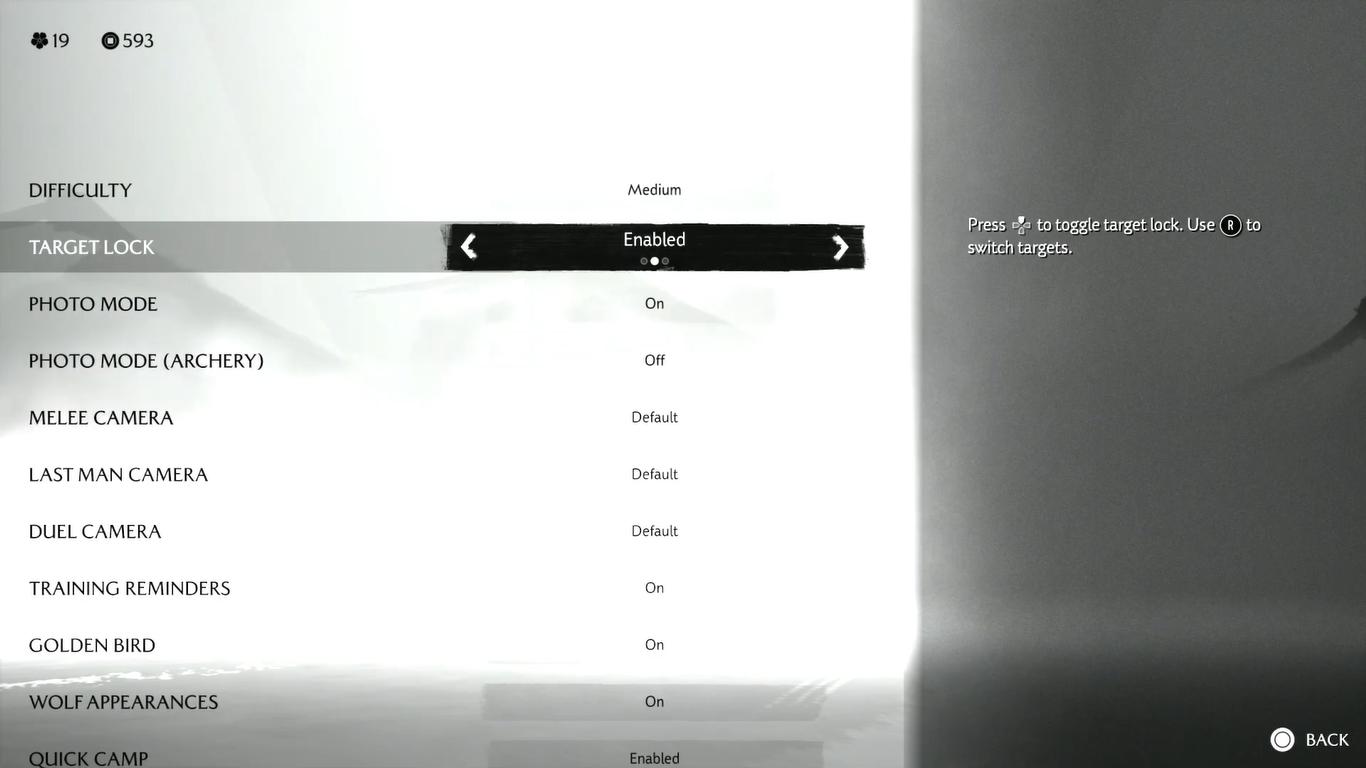
In the gameplay menu, the lock setting is set to disabled by default. You want to change it to one of the two available options.
- Enabled, which will keep the auto target active at all times.
- Swap on defeat, this is so automatically focused on the next enemy once the current enemy you’re hiding from gets incapacitated.
If you select enable, it will ensure that lock-on will remain consistent throughout.
When it’s enabled, all targets can be activated. If you press up on the deep pad after locking onto an enemy, you’ll be able to use the right thumb stick to switch between targets whenever you are surrounded.
This allows you to be aware of nearby enemies and make sure that the camera doesn’t unnecessarily drift.
Activating the auto target in Ghost of Yōtei is an effective way to increase your combat precision ceiling.
Also, check our Ghost of Yōtei Review and other guides below:
- Ghost of Yōtei Guide | 5 Best Armor to Get Early
- Ghost of Yōtei Beginner's Guide | Tips & Tricks
- Ghost of Yōtei Guide | How to Use Onryō’s Howl
- Ghost of Yōtei Guide | How to Complete Soma The Condemned Bounty
- Ghost of Yōtei Guide | How to Complete Smiling Yoshitomo Bounty
- Ghost of Yōtei Guide | How to Find Cave Altar of Reflection
- Ghost of Yōtei Guide | How to Play Forging Mini Game
- Ghost of Yōtei Guide | How to Play Shamisen Guitar Mini Game
- Ghost of Yōtei Guide | How to Get The Best Charms Early
- Ghost of Yōtei Guide | How to Set Travellers Map
- Ghost of Yōtei Guide | How to Craft Weapons & Gears
- Ghost of Yōtei Guide | How to Upgrade Weapons & Gears
- Ghost of Yōtei Guide | How to Parry
- Ghost of Yōtei Guide | How to Use Heavenly Slash Ability
- Ghost of Yōtei Guide | How to Get Kanemori’s Two Faced Mask
- Ghost of Yōtei Guide | How to Set Auto Lock Target
- Ghost of Yōtei Guide | How to Use Wolf’s Call Ability
- Ghost of Yōtei Guide | A Moment to Breathe Trophy
- Ghost of Yōtei Guide | Good with Coins Trophy (Coin Game)
- Ghost of Yōtei Guide | Fireside Performance Trophy
- Ghost of Yōtei Guide | Two as One & Wolf Bait Trophy
- Ghost of Yōtei Guide | Best Charms to Get
- Ghost of Yōtei Guide | All Armor Sets Location
- Ghost of Yōtei Guide | How to Use Dance of Wrath
Contributor, NoobFeed
Latest Articles
No Data.